


For many years, Google Camera vs iPhone Camera comparisons have always favored Google’s software as the gold standard of computational photography due to its ability to produce natural photos without heavy editing. However, the iPhone Camera has also changed significantly with its next-generation HDR and increasingly powerful processing algorithms. So, if the criterion is not which photo is brighter or sharper, but which one looks more natural, which camera system truly holds the upper hand?
- GOOGLE CAMERA VS IPHONE CAMERA — QUICK COMPARISON
- GOOGLE CAMERA VS IPHONE CAMERA — HDR PROCESSING
- GOOGLE CAMERA VS IPHONE CAMERA — COLOR SCIENCE
- GOOGLE CAMERA VS IPHONE CAMERA — SHADOWS, CONTRAST AND DEPTH
- GOOGLE CAMERA VS IPHONE CAMERA — SHARPENING AND TEXTURE
- GOOGLE CAMERA VS IPHONE CAMERA — WHICH CAMERA LOOKS MORE NATURAL IN DIFFERENT SCENARIOS?
- GOOGLE CAMERA VS IPHONE CAMERA — WHY “NATURAL” DOESN’T ALWAYS MEAN “BETTER”
- FAQ
- CONCLUSION
GOOGLE CAMERA VS IPHONE CAMERA — QUICK COMPARISON
The evolution of modern smartphone photography no longer relies solely on the physical dimensions of image sensors or glass elements. Instead, the race to capture reality accurately depends entirely on background algorithms executing the moment you press the shutter. When analyzing Google Camera vs iPhone Camera execution, these two systems yield completely different visual characteristics.
Overall differences in computational photography philosophy
The core software engineering of Google Camera vs iPhone Camera reveals contrasting aesthetic values. Google Camera focuses heavily on multi-frame exposure stacking techniques developed to preserve true environmental contrast. On the other hand, the default iPhone Camera pipeline focuses on maximizing visibility across the entire frame immediately.
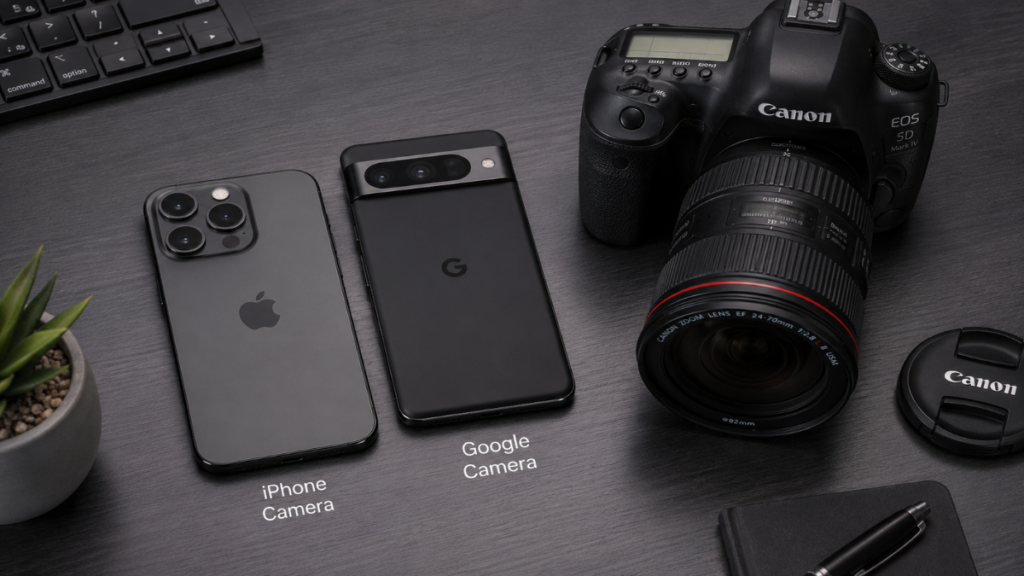
This difference in the Google Camera vs iPhone Camera setup changes how casual users experience everyday moments. While one system values physical realism, the other values instant social media readiness. Understanding this contrast helps us evaluate which application delivers genuinely natural smartphone photos.
| Feature | Google Camera | iPhone Camera |
| HDR Style | Contrast-preserving, dramatic | High-visibility, flattened exposure |
| Color Science | Cool, neutral, realistic | Warm, saturated, vibrant |
| Contrast | High micro-contrast | Low to medium contrast |
| Sharpening | Subtle, texture-focused | Aggressive edge-enhancement |
| Shadow Rendering | Deep, moody, structured | Bright, open, lifted noise-reduction |
| Highlight Recovery | Prioritized spectral control | Aggressive tone-mapping |
| Natural Look | Excellent for landscapes/street | Excellent for commercial portraits |
GOOGLE CAMERA VS IPHONE CAMERA — HDR PROCESSING
Dynamic range processing represents the primary technical battleground when comparing Google Camera vs iPhone Camera software. How each system balances extreme highlights against dark environments determines the believability of the final image file.
How Google Camera balances HDR without flattening the scene
The structural framework behind Google Camera vs iPhone Camera development shows that Google favors underexposure tracking to prevent highlight clipping. By maintaining original shadow depths, Google Camera prevents scenes from losing their three-dimensional characteristics.
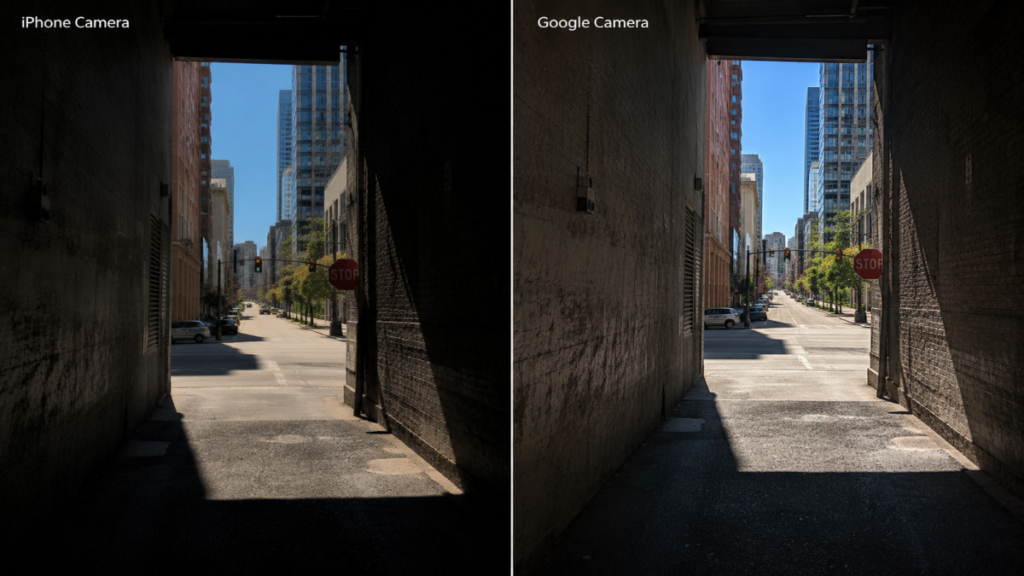
This approach allows Google Camera to capture authentic atmospheric mood without introducing flat digital artifacts. The system respects physical shadows instead of artificially forcing brightness into areas that should remain dark.
How iPhone Camera prioritizes visibility and balanced exposure
A direct Google Camera vs iPhone Camera analysis shows that Apple prefers highly illuminated midtones. The Smart HDR processing system lifts dark values significantly to ensure every background element remains completely clear.
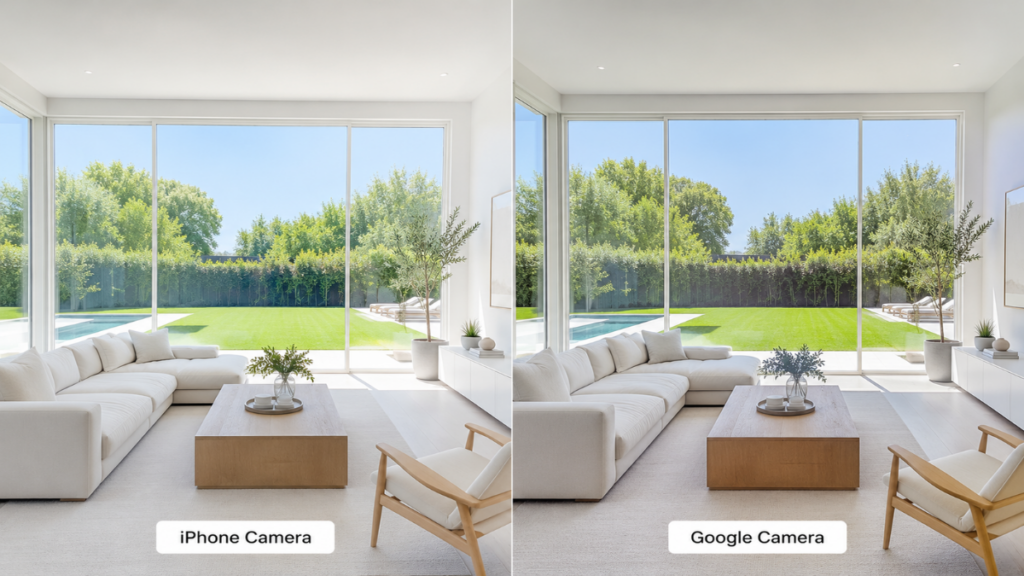
While this ensures great visibility, the heavy tone mapping often removes the natural gradient transitions of light. This flat presentation remains a distinct differentiator when comparing Google Camera vs iPhone Camera image outputs.
Read more: iPhone Camera vs Adobe Project Indigo: Is Less HDR Actually Better for Natural Photos?
| HDR Characteristic | Google Camera | iPhone Camera |
| Highlight Management | Strict clipping prevention, preserves source energy | High compression, sometimes clips in white clothing |
| Shadow Behavior | Allows black clipping to preserve composition depth | Aggressively lifts shadows, introduces visible software glow |
| Midtone Exposure | Kept conservative to match environmental lighting | Boosted to increase general subject visibility |
GOOGLE CAMERA VS IPHONE CAMERA — COLOR SCIENCE
The underlying camera color science dictates how sensor matrices translate wavelengths into digital color values. This element alters user perception when comparing Google Camera vs iPhone Camera files side by side.
Neutral colors vs warmer color rendering
The color balance of Google Camera vs iPhone Camera processing shows a clear split in temperature preferences. Google Camera utilizes a cooler, highly realistic color palette that reproduces exact environmental conditions accurately.
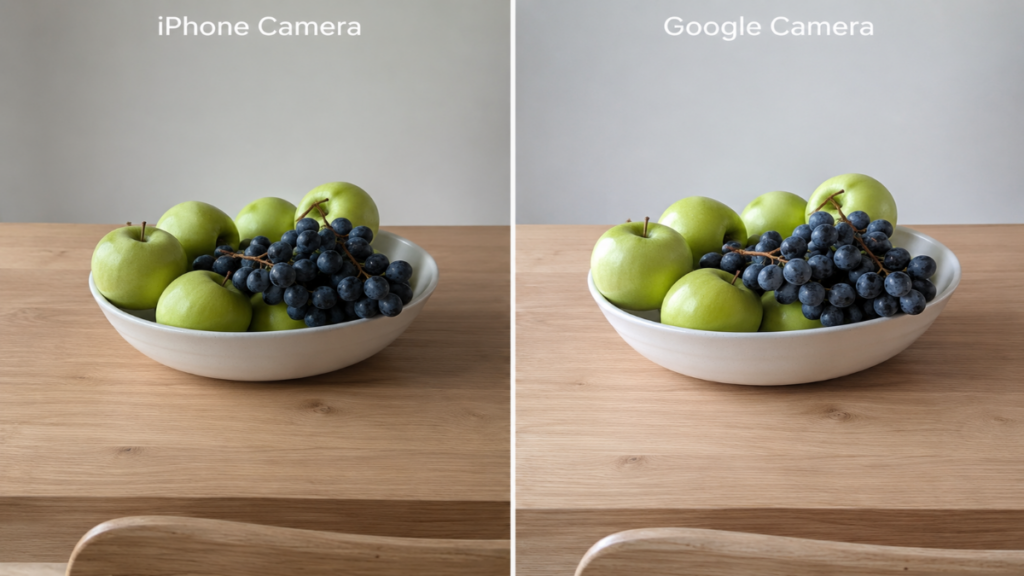
Conversely, the default iPhone Camera processing applies a distinctive warm amber undertone to most outdoor environments. This makes landscapes look inviting but often strays away from absolute physical reality.
Skin tone accuracy under different lighting conditions
Capturing human skin tone correctly remains a difficult task for modern smartphone camera processing. The Google Camera vs iPhone Camera performance here depends on skin tone mapping tech. Google uses Real Tone to keep diverse skin variations natural looking.
“Preserving authentic human skin tones requires a neutral white balance matrix that resists commercial beautification biases.”
Luna
The alternative Google Camera vs iPhone Camera profile shows that Apple adds heavy golden pigments to facial features. This creates a healthy appearance under sunlight but can look overly yellow under indoor lighting.
Landscape color reproduction
Environmental greens and blues shift depending on your choice of Google Camera vs iPhone Camera software. Google renders foliage with muted, earthy realism that matches true botanical shades. The iPhone boosts saturation levels across fields and skies, creating instant pop at the expense of accuracy.
| Scenario | Google Camera | iPhone Camera |
| Daylight Portrait | True skin undertones, accurate contrast | Warm skin tones, slightly oversaturated skin glow |
| Mixed Indoor Light | Neutral gray balance, controls yellow cast | Strong shift to warm amber tones across surfaces |
| Overcast Sky | Realistic gray-blue gradients maintained | Boosted blue saturation, unrealistic cyan tints |
GOOGLE CAMERA VS IPHONE CAMERA — SHADOWS, CONTRAST AND DEPTH
A flat photograph fails to convey a sense of genuine space. True visual depth requires deep contrast transitions, which represents another core divergence in the Google Camera vs iPhone Camera debate.
How each camera handles dark areas
The way Google Camera vs iPhone Camera pipelines treat dark regions alters the mood of an image. Google Camera retains deep black points, which prevents sensor noise from creeping into the frame.
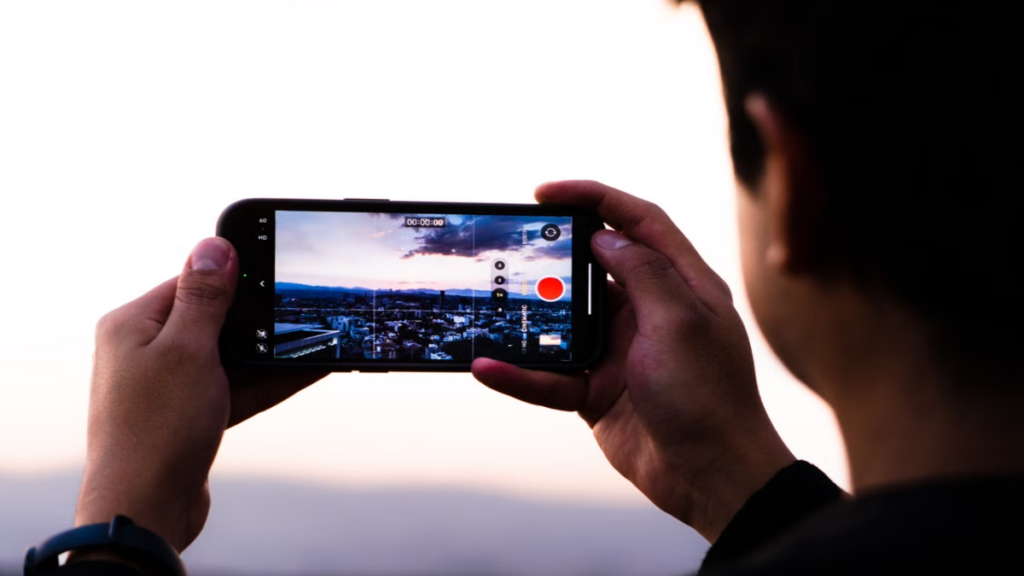
Meanwhile, the alternative approach in the Google Camera vs iPhone Camera comparison shows Apple lifting shadows aggressively. This can create a subtle gray film effect over dark corners, diminishing deep contrast.
Which camera creates stronger visual depth
Thanks to excellent micro-contrast tuning, the Google Camera vs iPhone Camera comparison favors Google for raw spatial separation. Subjects stand out naturally from backgrounds due to sharp edge-to-shadow transitions.
Why shadow rendering changes the mood of a photo
Altering shadow values changes the emotional narrative of an image. Images from Google Camera provide a cinematic, moody atmosphere by allowing shadows to exist naturally. The iPhone focuses on maximum information retrieval, which can sometimes reduce artistic storytelling value.
| Comparison | Google Camera | iPhone Camera |
| Micro-contrast | High; accentuates edge transitions | Low to medium; flattens surface textures |
| Subject Separation | Distinct; naturally pops without portrait blur | Soft; relies heavily on depth-map computation |
| Environmental Mood | Cinematic, dramatic, true to time of day | Standardized, highly illuminated, informational |
GOOGLE CAMERA VS IPHONE CAMERA — SHARPENING AND TEXTURE
Artificial sharpening algorithms can easily ruin fine details. Comparing Google Camera vs iPhone Camera texture rendering reveals different engineering paths toward clarity.
Fine detail preservation
The micro-detail management of Google Camera vs iPhone Camera pipelines shows different approaches to rendering. Google Camera leaves fine surfaces alone, allowing natural stone, wood, and fabrics to maintain their original matte quality.
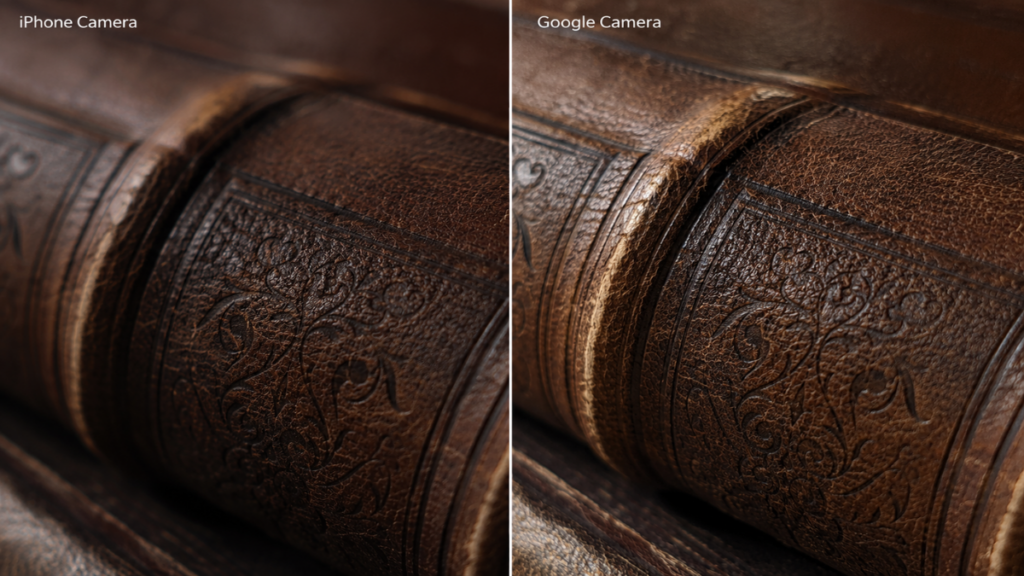
In contrast, the current Google Camera vs iPhone Camera dynamic shows Apple utilizing aggressive detail enhancement filters. This can make fine lines appear overly sharp, digital, and unnatural when viewed closely.
More Read

Hair, skin and fabric rendering
When capturing complex details like human hair or delicate garments, the Google Camera vs iPhone Camera difference is noticeable. Google preserves individual hair strands cleanly, whereas the iPhone can occasionally clump fine textures together due to heavy computational processing.
When sharpening starts looking artificial
Over-sharpening becomes obvious around high-contrast edges like leaves against a bright sky. The iPhone processing loop can introduce faint white halos along these boundaries. Google Camera keeps these edges smooth, mimicking the natural characteristics of optical glass lenses.
| Texture Detail | Google Camera | iPhone Camera |
| Fine Linework | Smooth, continuous, resembles optical glass | Hard, segmented, signs of aggressive filtering |
| Textile Fiber | Retains natural matte qualities | Appears plastic-like due to high contrast sheen |
| Human Skin Art | Preserves pores without changing fine micro-shadows | Can look overprocessed or artificially enhanced |
GOOGLE CAMERA VS IPHONE CAMERA — WHICH CAMERA LOOKS MORE NATURAL IN DIFFERENT SCENARIOS?
Real-world environments challenge image processing pipelines in unique ways. No single platform wins every scenario in the ongoing Google Camera vs iPhone Camera debate.
Portrait photography
For portraits, the Google Camera vs iPhone Camera choice depends on your preference for realism. Google records exact skin textures honestly, while the iPhone optimizes facial brightness immediately, creating an appealing commercial look without extra work.
Indoor lighting
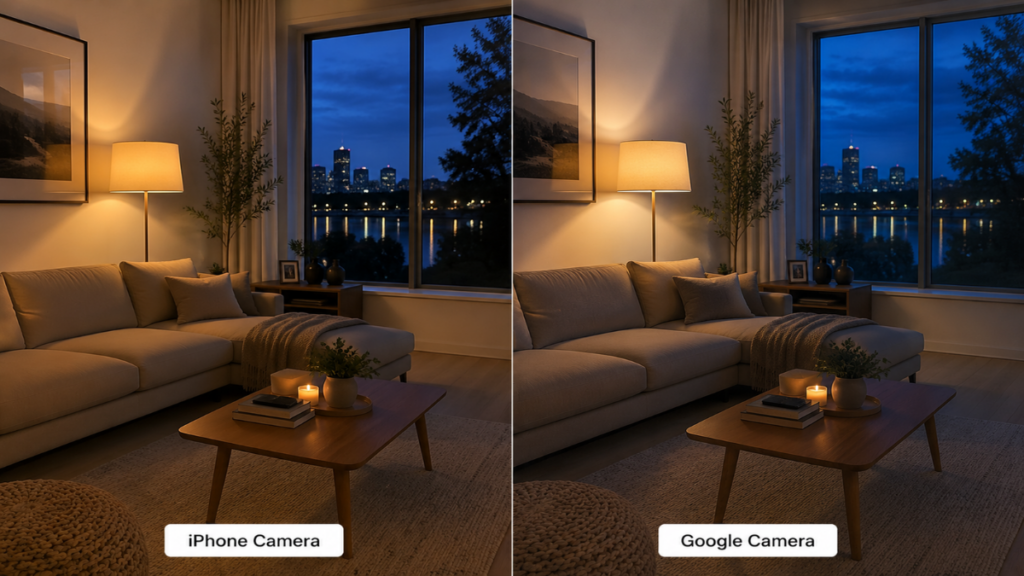
Indoor spaces filled with mixed artificial lights test white balance systems. A Google Camera comparison shows excellent light source isolation, preventing yellow color casts. The iPhone tends to warm up the entire room, which looks cozy but loses color accuracy.
Night photography
Night environments highlight completely different philosophies between Google Camera vs iPhone Camera software. The iPhone lifts dark skies toward navy blue shades to capture details. Google Camera keeps night skies deep black, illuminating only areas touched by actual light sources.
Landscapes
Nature shots processed via Google Camera retain excellent dimensional cloud geometry. The iPhone Camera comparison shows brighter, vivid colors that look striking immediately, though they can occasionally lose subtle atmospheric gradients.
Street photography
Street photographers often prefer the Google Camera vs iPhone Camera balance found in Google hardware. The high contrast and deep shadow rendering provide a gritty, cinematic look right out of the camera, capturing raw urban life perfectly.
| Shooting Scenario | Better Choice | Why |
| Portrait photography | iPhone Camera | Commercial optimization, flatters the human subject instantly |
| Indoor lighting | Google Camera | Superior white balance separation under mixed artificially lit rooms |
| Night photography | Google Camera | Preserves night atmosphere without artificially inflating ambient brightness |
| Landscapes | Google Camera | Maintains clouds geometry and avoids harsh halo artifacts on horizons |
| Street photography | Google Camera | Provides cinematic heavy contrast and deep shadows out-of-the-box |
GOOGLE CAMERA VS IPHONE CAMERA — WHY “NATURAL” DOESN’T ALWAYS MEAN “BETTER”
Defining what makes an image natural requires balancing objective technical rendering with subjective visual preferences. Realism does not always equal the most popular aesthetic choice.
The difference between realistic and visually pleasing photos
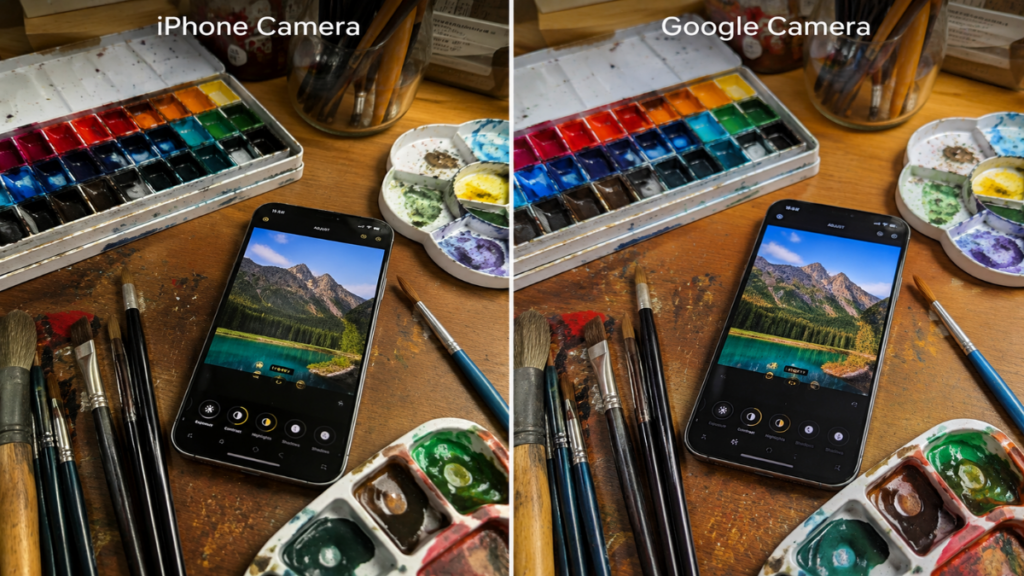
An accurate image can look flat if environmental lighting was poor during capture. In these moments, the Google Camera vs iPhone Camera dynamic shifts. The iPhone uses heavy color processing to turn a dull frame into a vibrant, engaging image.
Why some users actually prefer stronger HDR
Most everyday users do not edit files in professional post-processing software. They need an application that delivers ready-to-share results instantly. This makes the heavily processed, bright look of the iPhone very appealing for general use.
Choosing a camera based on your photography style
If you value traditional photography principles, rich shadows, and accurate colors, Google Camera remains the superior choice. If you prefer bright, consistently illuminated images that look vibrant on social feeds immediately, the iPhone Camera is an excellent tool.
FAQ
Does Google Camera always produce more natural photos?
Not always. In extreme low-light situations, the contrast processing can sometimes over-sharpen fine details, making images look slightly harsh rather than perfectly natural.
Why do some people think iPhone photos look too processed?
This is typically caused by aggressive Smart HDR tone mapping and detail enhancement filters, which can flatten shadows and introduce artificial halos around edges.
Can Google Camera be installed on an iPhone?
No, the official app cannot be installed on iOS due to operating system limits. However, third-party apps can mimic similar processing styles on iPhone hardware.
Which camera is better for social media without editing?
The iPhone generally wins for instant sharing due to its bright midtones and warm color science, which make images pop on social media feeds right away.
CONCLUSION
The ongoing Google Camera vs iPhone Camera comparison highlights two distinct directions for modern mobile photography. Google Camera champions physical realism, deep contrast, and authentic colors. The iPhone Camera prioritizes high visibility, vibrant tones, and instant commercial appeal. Choosing the best system depends entirely on your personal creative vision and how you want to capture the world.
LEAVE A COMMENT TO GET FREE EXPERT ADVICE OR FOLLOW OUR WEBSITE THE COUCH INSIDER TO UPDATE THE LATEST KNOWLEDGE