


Imagine two families living in identical suburban developments. They visit the same electronics store on the same day and purchase the exact same model of internet wireless extender. Both families are eager to eliminate their wifi dead zone issues, so they install the devices in their respective homes following the manufacturer’s instructions. By the end of the week, the first family is enjoying seamless 4K streaming in every room, including the basement. The second family, however, finds themselves still struggling with dropped connections the moment they step onto the second floor. They conclude that the hardware is “useless” and return it for a refund.
- An Internet Wireless Extender Can Only Repeat the Signal It Receives—It Cannot Create a Better One
- The Layout of Your Home Has More Influence Than the Internet Wireless Extender You Buy
- The Walls Inside Your House May Be Blocking More WiFi Than You Realize
- Where You Place the Internet Wireless Extender Matters More Than Its Brand
- Why Two Homes With the Same Internet Speed Can Get Completely Different Results
- Wireless Interference Is the Hidden Variable Most Buyers Never Consider
- Why the Same Internet Wireless Extender Receives Five-Star Reviews From One Buyer and One-Star Reviews From Another
- Before Replacing Your Internet Wireless Extender, Check These Common Problems First
- When an Internet Wireless Extender Is Actually the Wrong Solution
- The Real Lesson: Your Home Determines Whether an Internet Wireless Extender Succeeds or Fails
If the hardware is identical, why are the results so vastly different? The answer lies not in the device itself, but in the unique ecosystem of each home. This article explores why your environment dictates the performance of your internet wireless extender and why blaming the hardware is often a misunderstanding of how networking technology functions.
An Internet Wireless Extender Can Only Repeat the Signal It Receives—It Cannot Create a Better One
Many consumers mistakenly believe that an internet wireless extender acts as a signal booster that magically injects more speed into their network. In reality, the device is essentially a repeater. It captures the existing wifi signal from your primary router, then broadcasts that same signal to an area it previously could not reach.
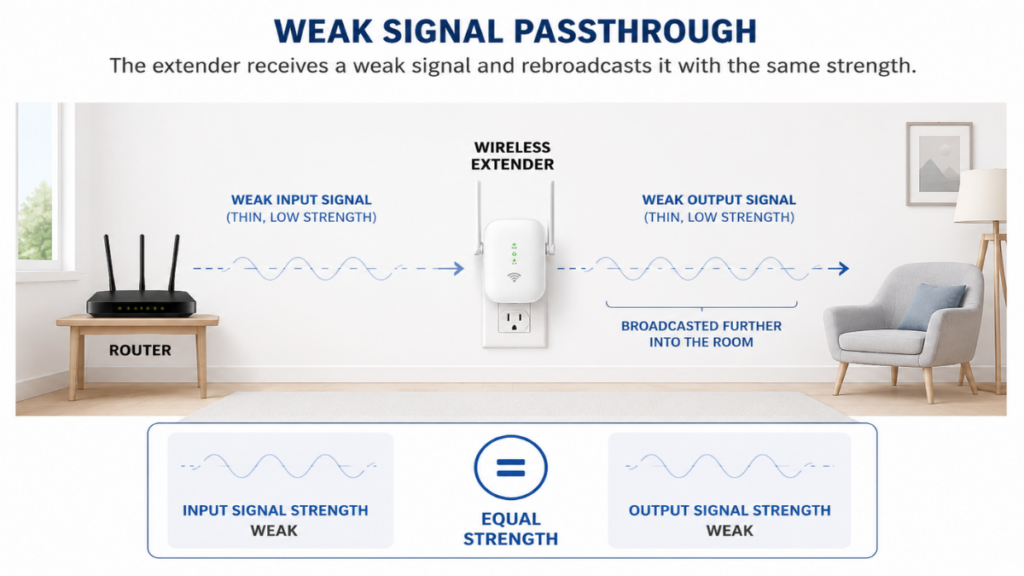
Crucially, there is a distinct difference between extending your wifi coverage and increasing your internet speed. If your router is only providing 20 Mbps to the hallway where you placed the wifi extender, the extender cannot provide 500 Mbps to your bedroom. It can only transmit what it captures. If the input is weak or noisy, the output will be exactly the same. Understanding this fundamental limitation is the first step toward optimizing your home wifi setup.
The Layout of Your Home Has More Influence Than the Internet Wireless Extender You Buy
The physical architecture of your home serves as the primary obstacle or facilitator for your wireless network. Every wall, corner, and staircase plays a role.
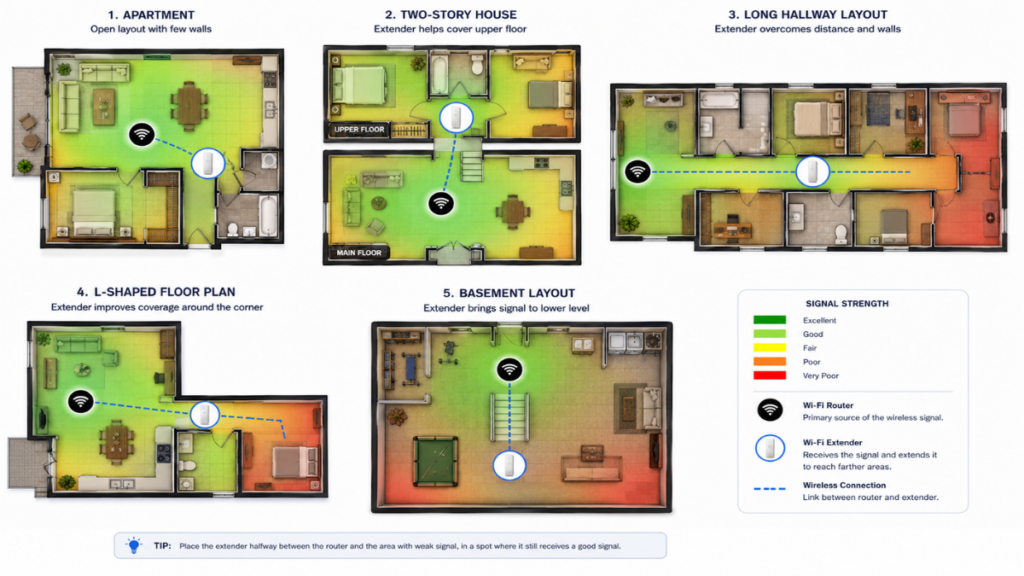
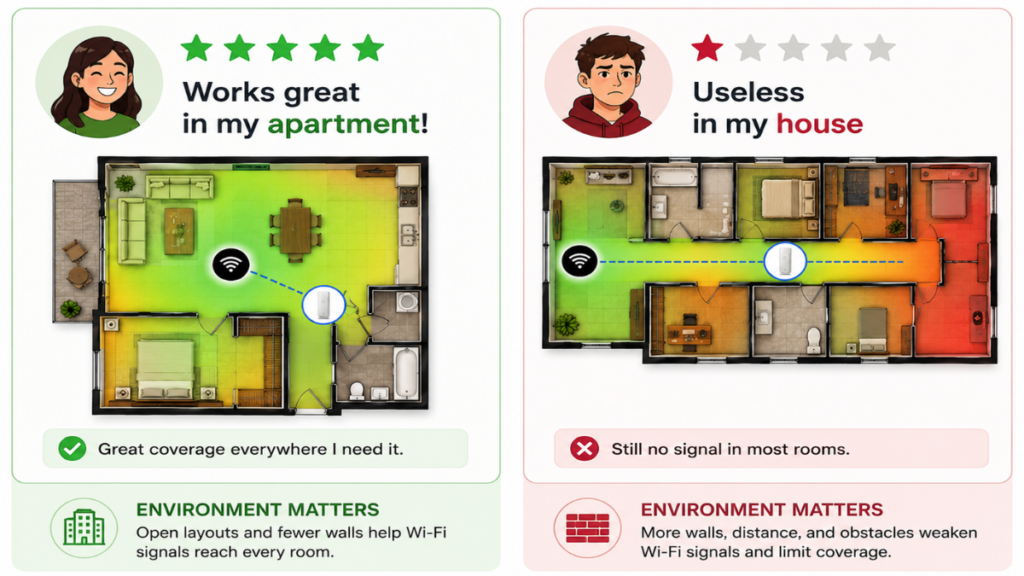
Small Apartment With an Open Floor Plan
In smaller, open-concept spaces, an internet wireless extender usually performs exceptionally well. With fewer walls to obstruct the wifi signal, the router can easily reach the extender, which in turn can blanket the remaining corners of the apartment with a stable connection.
Two-Story Homes
Multi-story homes present a unique challenge. Signals do not just travel horizontally; they must penetrate floors and ceilings. If your router is on the ground floor and the internet wireless extender is on the second floor, the signal is fighting against dense wooden beams and thick subflooring, which significantly degrades performance.
Long Hallway Houses
In long, narrow houses, the distance between the router and the end-users is often the culprit. A single internet wireless extender might work if placed strategically in the middle of the hallway, but if the house is too long, the signal might degrade before it even reaches the extender.
L-Shaped Homes
L-shaped layouts often create “blind spots” where the wifi signal is physically blocked by the corner of the house. Placing an internet wireless extender at the pivot point of the “L” is often the only way to bend the signal around the corner effectively.
Basement and Garage
These areas are notorious for being the final frontier for wifi coverage. Often, these spaces are shielded by concrete or metal, creating a near-impossible barrier for a standard internet wireless extender to bridge.
The Walls Inside Your House May Be Blocking More WiFi Than You Realize
Your home’s construction materials act as filters for electromagnetic waves. While we often look for the best wifi extender, we rarely look at what our walls are made of.
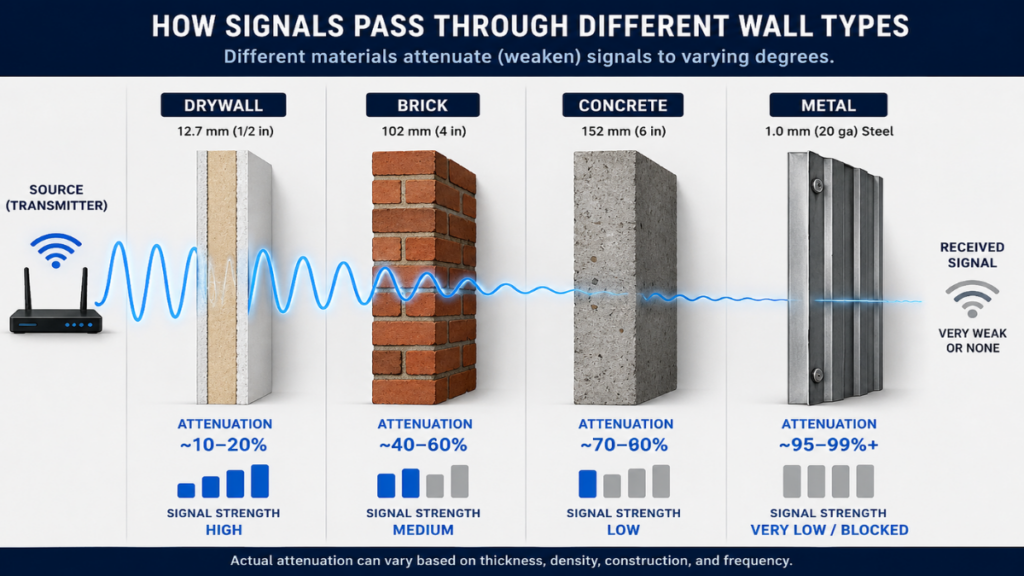
Drywall
Standard interior walls made of drywall are relatively thin and have a minimal impact on your wifi signal. This is why your connection is often strongest in the room where your router is located.
Brick
Brick is denser and contains more moisture than drywall. An internet wireless extender will lose a significant portion of its signal strength when trying to push through a brick wall, often resulting in high latency.
Reinforced Concrete
This is the ultimate enemy of the internet wireless extender. The steel rebar inside concrete acts as a Faraday cage, effectively blocking or drastically weakening wireless signals.
Metal Structures
Metal surfaces are highly reflective. If you place your wireless extender near large metal objects, the signal can bounce in unpredictable ways, creating interference and dead zones.
Mirrors, Large Appliances, and HVAC Systems
Many people don’t realize that large mirrors, refrigerators, and metal ductwork for HVAC systems can disrupt a wifi signal. These are often overlooked sources of interference that cause an internet wireless extender to fail.
Where You Place the Internet Wireless Extender Matters More Than Its Brand
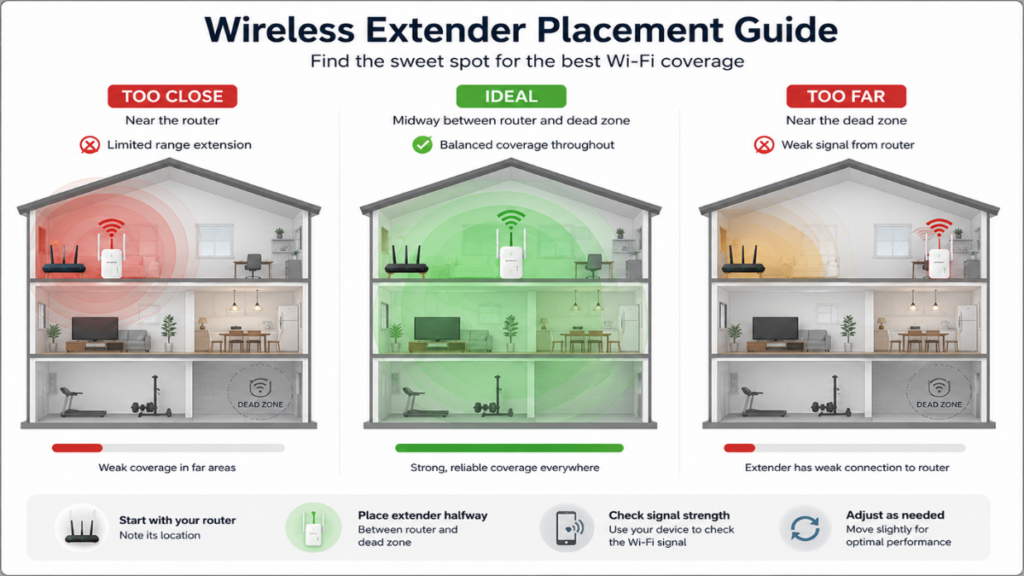
The “golden rule” of networking is router placement, followed closely by the placement of your internet wireless extender.
Too Close to the Router
If you place your wifi extender within 5 feet of the router, you are wasting the device’s potential. It will have a great signal, but it won’t be covering any new ground.
Too Far Away
Conversely, if you place it at the edge of the range where the signal is barely a flicker, the internet wireless extender will struggle to maintain a stable link, leading to frequent disconnects and poor internet speed.
The Ideal Placement
The sweet spot is halfway between the router and the dead zone. You want the extender to receive a strong, stable signal so that it can relay that same quality to your devices.
“Successful connectivity is not about the strength of your hardware, but the intelligence of its location.”
Luna
Why Two Homes With the Same Internet Speed Can Get Completely Different Results
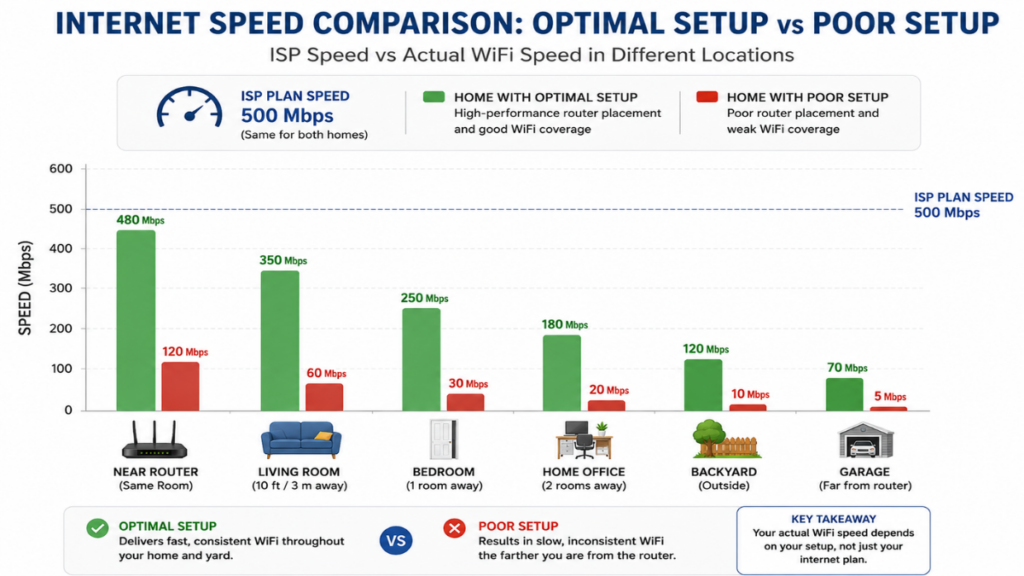
Consumers often equate internet speed with wifi quality, but they are two distinct metrics.
Imagine two neighbors, both subscribing to a 500 Mbps plan. Neighbor A has a high-end router and an open floor plan; they might see 480 Mbps throughout their home. Neighbor B has an older router, thick concrete walls, and an improperly placed internet wireless extender; they might see only 30 Mbps in their bedroom. Even with the same subscription, the “pipe” inside the home is fundamentally different.
Wireless Interference Is the Hidden Variable Most Buyers Never Consider
Even if your internet wireless extender is placed perfectly, invisible forces might be sabotaging your network. Wireless interference is the silent killer of home wifi performance.
More Read

- Neighboring WiFi networks: In dense neighborhoods, dozens of signals compete for the same channels.
- Bluetooth devices: They operate on the same 2.4 GHz frequency as many older devices.
- Microwave ovens: A known source of significant disruption when in use.
- Baby monitors and wireless cameras: These devices often broadcast constantly, eating into your bandwidth.
- Smart home devices: A house full of IoT sensors can lead to congestion.
Why the Same Internet Wireless Extender Receives Five-Star Reviews From One Buyer and One-Star Reviews From Another
This phenomenon is exactly why reading product reviews can be misleading. A reviewer who lives in a small wooden house will give the internet wireless extender five stars. A reviewer who lives in a large concrete house will give it one star. Neither is lying; they are simply experiencing the same technology in vastly different environments. This is why you should look for professional troubleshooting advice rather than just aggregated ratings when searching for a wifi extender solution.
Before Replacing Your Internet Wireless Extender, Check These Common Problems First
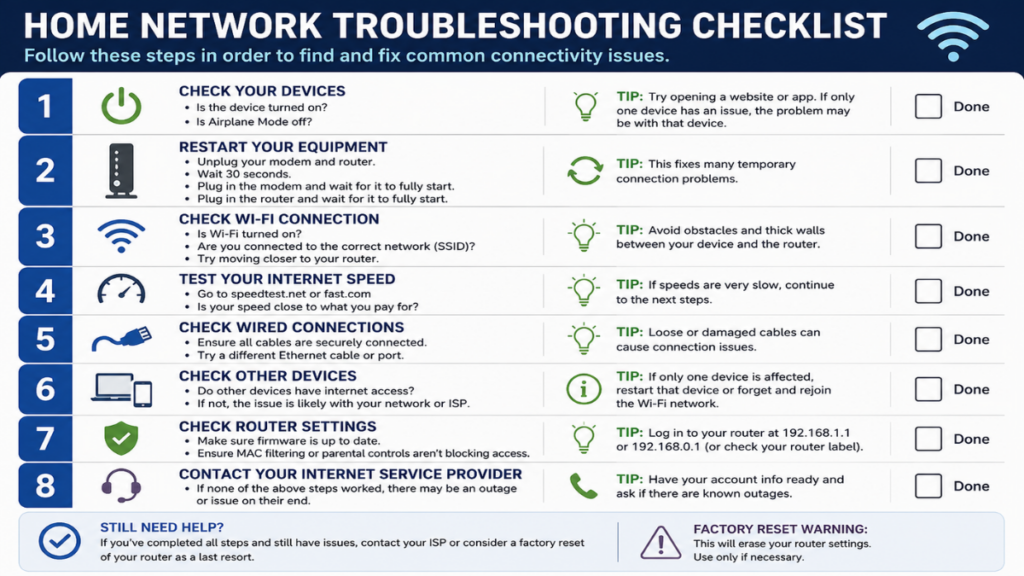
If your connection is lagging, run through this checklist before discarding your current equipment:
- Router placement: Is your router hidden behind the TV or in a cabinet?
- Extender placement: Can you move it five feet closer to the router?
- Wall materials: Are you trying to push a signal through a chimney or metal wall?
- WiFi band selection: Are you using 2.4 GHz for distance or 5 GHz for speed?
- Firmware updates: Have you checked the manufacturer’s website for the latest software?
- Device compatibility: Does your device support the latest standards?
- ISP modem configuration: Is your modem causing a double-NAT issue?
When an Internet Wireless Extender Is Actually the Wrong Solution
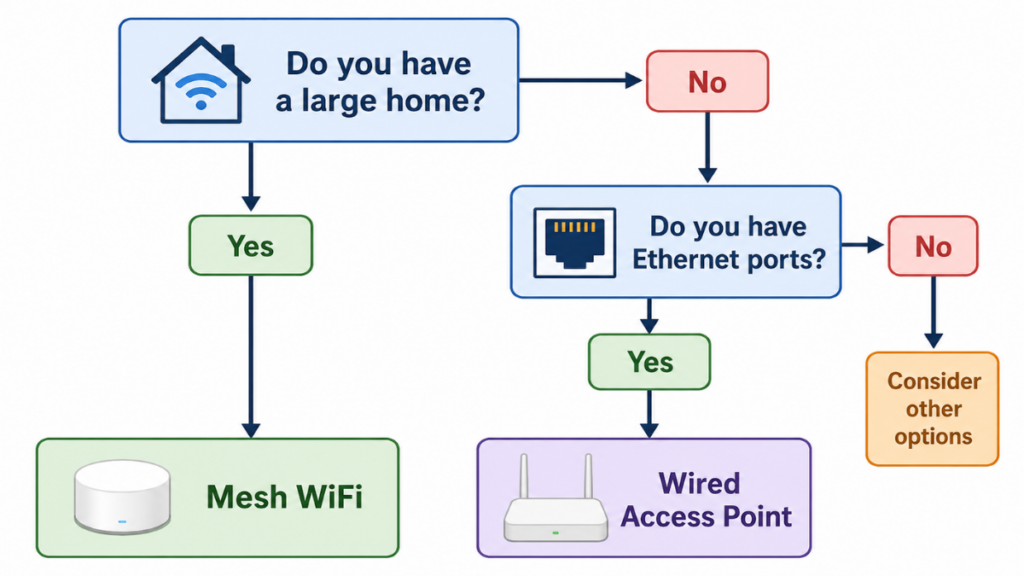
Sometimes, an internet wireless extender simply isn’t the right tool for the job.
Mesh WiFi
If your home is large and multi-story, a mesh wifi system is almost always a superior choice. Unlike a single extender, a mesh network uses multiple nodes that work together to create a unified, seamless network.
Wired Access Point
For the highest possible speeds, a hard-wired access point connected via Ethernet is the gold standard. It provides a dedicated link back to your router that is immune to wireless interference.
Ethernet Backhaul
If you have Ethernet ports in your home, use them. An internet wireless extender that supports Ethernet backhaul can provide performance nearly equal to a wired access point.
Powerline Networking
In scenarios where you cannot run cables, powerline adapters can use your home’s existing electrical wiring to transport data, bypassing thick walls and floors entirely.
The Real Lesson: Your Home Determines Whether an Internet Wireless Extender Succeeds or Fails
There is no single “best” internet wireless extender that works perfectly for every household. The device is a participant in your home’s physical and electronic environment. A model that becomes the hero of a high-speed, seamless network in one home might be completely blocked by the concrete walls of another.
“A network is not a product you buy; it is an environment you cultivate through strategic placement and understanding of your home’s unique limitations.” – Author: Luna
Before you ask, “What is the best internet wireless extender?” consider asking, “What is physically preventing the wifi signal from reaching my devices?” By addressing the root cause—whether it be router placement, building materials, or local interference—you will find a solution that works for your specific home, not just the one that worked for a stranger on the internet.
DO YOU HAVE QUESTIONS ABOUT YOUR HOME NETWORK OR NEED HELP OPTIMIZING YOUR SETUP? LEAVE A COMMENT BELOW TO GET ADVICE FROM OUR EXPERTS, OR FOLLOW THE COUCH INSIDER TO KEEP UPDATED WITH THE LATEST KNOWLEDGE IN HOME NETWORKING TECHNOLOGY.