



Internet users frequently search for quick ways to bypass geographical blocks, bypass local firewalls, or hide their geographic location. A free browser extension or web-based proxy solution often seems like an ideal fix. However, behind the convenient promise of instant protection lies a complex landscape of technical vulnerabilities. When relying on an unverified website vpn tool, users often assume that their entire browser traffic is fully encrypted and hidden from third-party observation. Unfortunately, the underlying architecture of modern web browsers frequently exposes users to severe security gaps that completely invalidate these privacy promises.
- Understanding the Hidden Threats of Free Website VPN Tools
- How WebRTC Leaks Expose Your Real IP via Website VPN Services
- The DNS Leak Vulnerability in Free Online Website VPN Extensions
- How Free Website VPN Providers Turn Your Device into a Proxy Node
- Essential Steps to Perform a WebRTC Leak Test on Your Website VPN
- Critical Security Tips to Fix WebRTC and DNS Leaks
- Evaluating Online Website VPN Security Before Usage
- Best Practices for Maintaining Privacy Beyond Website VPN Extensions
- Conclusion

Understanding the Hidden Threats of Free Website VPN Tools
To understand why a browser-based proxy or lightweight plugin fails, one must examine how browser extensions interact with network protocols. A standard browser plugin functions primarily as a local proxy rather than a comprehensive, system-level virtual private network. While a full system client reroutes every bit of device traffic through an encrypted tunnel at the operating system level, a browser plugin operates strictly within the confines of the browser application layer.
This fundamental architectural difference creates major security loopholes. When using a lightweight website vpn extension, only basic HTTP and HTTPS requests are routed through the designated remote proxy server. Other browser background processes, media transport protocols, and real-time communication modules often bypass this tunnel entirely. As a result, third-party trackers, Internet Service Providers (ISPs), and malicious server operators can easily observe your true identity without your knowledge.
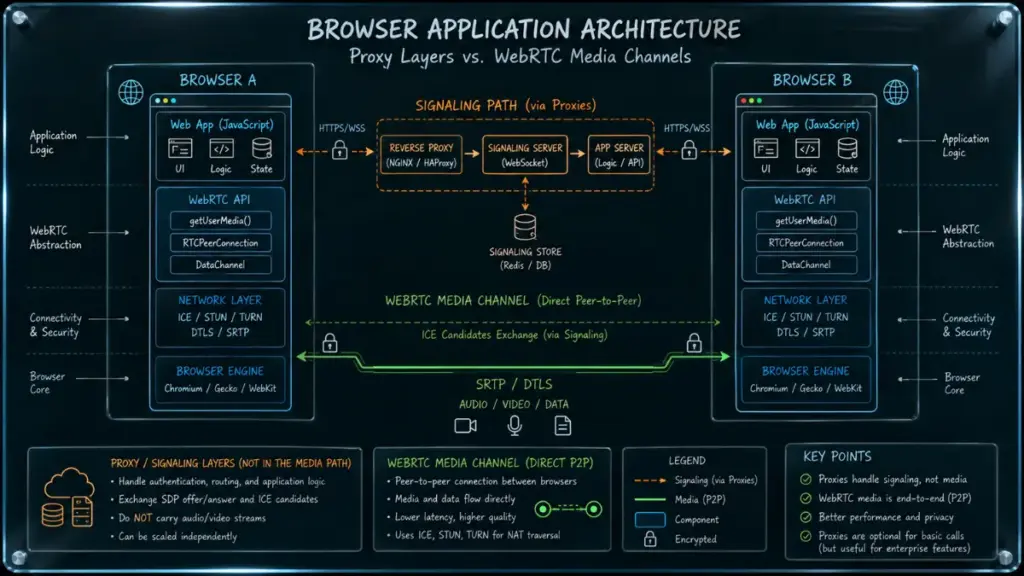
Many commercial providers offering no-cost browser plugins monetize their services through alternative, intrusive methods. Maintaining server infrastructure across global datacenters requires substantial financial expenditure. When a service provider offers a free website vpn without charging subscription fees, the user effectively becomes the product. Data collection, session tracking, bandwidth resale, and aggressive ad injection are standard operational models for free proxy utilities.
Furthermore, user trust is frequently exploited by aggressive marketing terms. Concepts such as “bank-grade encryption” or “complete anonymity” are regularly used to promote simple proxy plugins that lack basic encryption standards. Understanding these fundamental operational realities is the first critical step toward securing your personal digital footprint.
Read more: Passkey vs Password: Which Is More Secure?
How WebRTC Leaks Expose Your Real IP via Website VPN Services
Web Real-Time Communication, commonly known as WebRTC, is an open-source framework embedded directly inside modern web browsers like Chrome, Firefox, Edge, and Safari. It enables video conferencing, peer-to-peer file sharing, and voice calling directly within web pages without requiring extra plugins or external software installations. To establish direct peer-to-peer connections between two devices, WebRTC must discover the shortest network path available.
To achieve fast, low-latency connectivity, WebRTC uses specialized protocols known as Interactive Connectivity Establishment (ICE), Session Traversal Utilities for NAT (STUN), and Traversal Using Relays around NAT (TURN). During this discovery phase, the browser queries STUN servers to determine the public IP address and local network configuration of the host device. This operation happens entirely in the background, executed by native browser code that operates below the application layer of a standard website vpn extension.
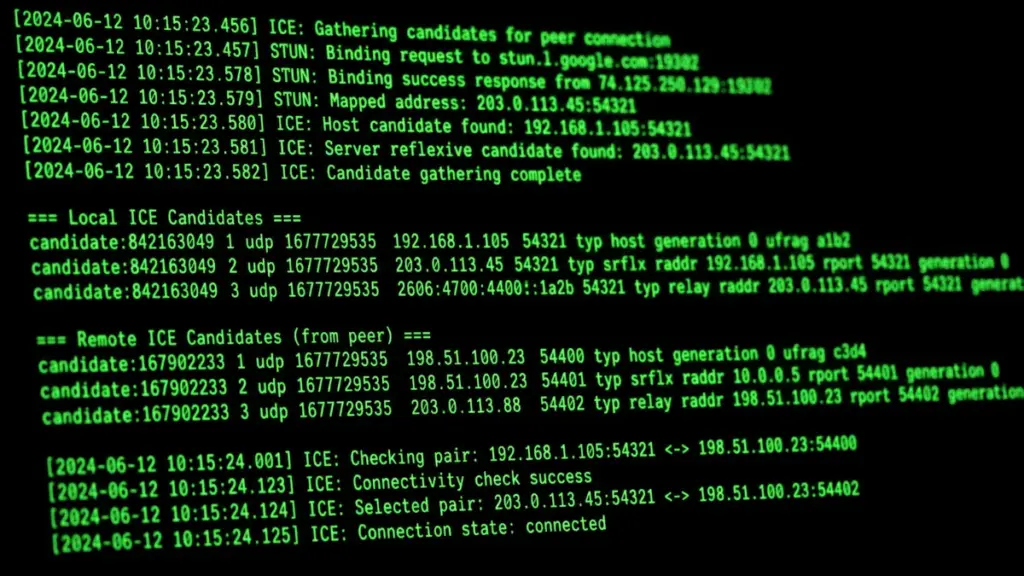
Because lightweight proxy extensions only alter HTTP/HTTPS requests, they do not intercept or modify low-level WebRTC socket queries. When a website executes a small JavaScript snippet asking the browser for its ICE candidates, WebRTC executes its discovery process. The STUN server returns your true local and public IP addresses, bypassing the active website vpn tunnel completely.
| Step | System Component | Data Flow / Action | Security Status |
| 1. Client Application | Browser Request | The webpage executes a JavaScript query demanding real-time communication parameters via WebRTC. | Initialized |
| 2. Native API Layer | WebRTC API | The browser queries low-level network interfaces, completely bypassing browser proxy configurations. | Bypasses Proxy |
| 3. External Discovery | STUN Server | Direct UDP requests are dispatched to STUN servers to locate true local and public IP addresses. | Vulnerability Active |
| 4. Exposure Point | True Public IP Exposed | Your actual residential IP address is returned directly to the webpage without encryption. | Complete Compromise |
This structural failure creates a dangerous false sense of security. You might see a green indicator on your browser extension showing a connection to a remote server in another country, while any website you visit can simultaneously query WebRTC via JavaScript to discover your real location.

The DNS Leak Vulnerability in Free Online Website VPN Extensions
Domain Name System (DNS) requests serve as the foundational directory of the internet, translating human-readable web addresses like example.com into machine-readable numerical IP addresses. Under secure networking conditions, your device sends every DNS request through an encrypted tunnel directly to a private DNS resolver managed by your security provider.
However, a severe DNS leak vulnerability frequently occurs when utilizing low-cost or poorly configured browser extensions. Instead of intercepting every domain lookup, a flawed browser website vpn allows your local operating system to process DNS requests through your default Internet Service Provider (ISP) servers.
“Relying on a browser proxy without native DNS handling creates a false sense of privacy; your domain lookup queries continue to broadcast your entire browsing history directly to your local network provider.”
Luna
When a DNS leak occurs, your actual web browsing habits remain entirely visible to local network administrators, corporate firewalls, public Wi-Fi operators, and your ISP. Even if your ultimate data traffic appears to originate from a proxy IP address, the underlying request logs stored on DNS servers clearly link your real location to every domain name visited.
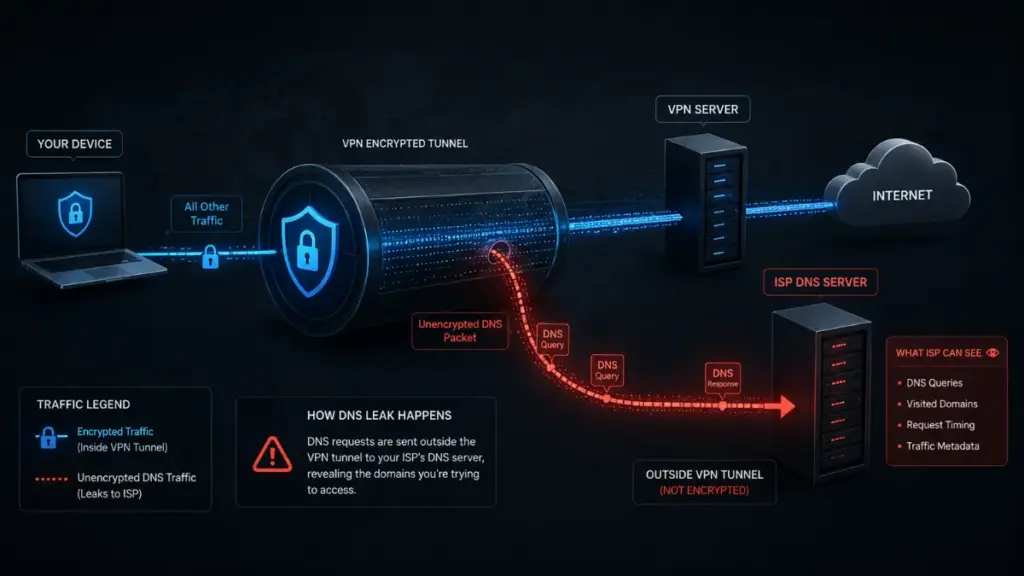
Furthermore, malicious free proxy operators can intentionally configure their infrastructure to run rogue DNS servers. By capturing your incoming lookup queries, rogue operators can redirect your browser to spoofed banking portals, malicious advertising networks, or credential-harvesting phishing pages. Without verified end-to-end DNS encryption protocols such as DNS-over-HTTPS (DoH) or DNS-over-TLS (DoT) fully integrated into your website vpn, your entire web session remains highly vulnerable.
How Free Website VPN Providers Turn Your Device into a Proxy Node
One of the most concerning discoveries regarding free proxy utilities is the silent monetization strategy that converts user hardware into exit nodes for commercial proxy networks. Maintaining physical servers worldwide requires immense funding. To cover these overhead costs without subscription charges, several major free browser proxy providers adopt peer-to-peer (P2P) resource-sharing models.
When installing a free website vpn extension, users typically accept long, complex Terms of Service (ToS) documents without reading the fine print. Deep within these legal clauses lies permission for the provider to sell your unused bandwidth and local IP address to third-party commercial networks. Once granted, your desktop or laptop is silently onboarded as a residential proxy node.

When your computer acts as a proxy relay, third-party paying customers route their network traffic directly through your residential internet connection. This operational structure presents severe personal and legal dangers:
- Cybercriminal Abuse: Malicious actors purchase access to residential proxy pools to conduct credential stuffing attacks, automated vulnerability scanning, and illegal content distribution using your IP address.
- Legal Exposure: Law enforcement agencies tracking cyberattacks will trace the malicious activity back to the registered owner of the public IP address, which belongs directly to your home router.
- Performance Degradation: Your personal network bandwidth, upload speed, and device memory are continuously consumed by background traffic generated by unknown third parties.
- Local Network Probing: Advanced proxy scripts can probe other smart hardware connected to your local Wi-Fi router, creating secondary security risks for your home network.

The reality of these P2P bandwidth harvesting schemes means that using a free website vpn tool does not increase your privacy. Instead, it directly surrenders your clean digital footprint to commercial proxy resellers and unknown third-party actors.
Essential Steps to Perform a WebRTC Leak Test on Your Website VPN
Given the severe risks associated with structural browser leaks, verifying the integrity of your current connection is an essential operational requirement. Conducting a routine WebRTC leak test allows you to verify whether your true IP address remains exposed to the web pages you visit.
More Read


To execute a comprehensive diagnostic test on your active connection, follow this systematic procedure:
| Diagnostic Metric | Observed Result | System Evaluation | Security Status |
| Public IP Displayed | Remote Server IP | Primary HTTP proxy routing is active | [PASS] |
| WebRTC STUN Query | True Residential IP Revealed | Low-level browser queries bypassed the proxy tunnel | [FAIL – LEAK DETECTED] |
| DNS Lookup Server | ISP Local Resolver | Domain name queries are falling back to your local ISP | [FAIL – LEAK DETECTED] |
- Disconnect Your Proxy: First, ensure your browser extension is completely turned off.
- Establish Baseline Information: Visit a reputable IP checking resource to note your true public IPv4 address, IPv6 address, and active ISP hostname.
- Activate Your Extension: Enable your website vpn and select a remote server node in a different geographic region.
- Check Public IP Display: Refresh your diagnostic page. Verify whether the primary display reflects the remote server IP address rather than your original residential IP address.
- Run Deep WebRTC Diagnostic: Access a dedicated testing utility that executes STUN candidate gathering via JavaScript.
- Inspect Candidate Results: Carefully inspect the results table under Public IP, Local IP, and STUN Candidates.
If your original residential IP address or local ISP network name appears anywhere within the STUN candidate results table, your website vpn is failing to provide adequate protection. Immediate corrective action is required to seal these diagnostic leaks.
Critical Security Tips to Fix WebRTC and DNS Leaks
If your diagnostic tests expose active leaks, relying on the basic settings of a simple browser proxy is insufficient. Implementing advanced mitigation steps ensures your network traffic remains secure across all web interactions.
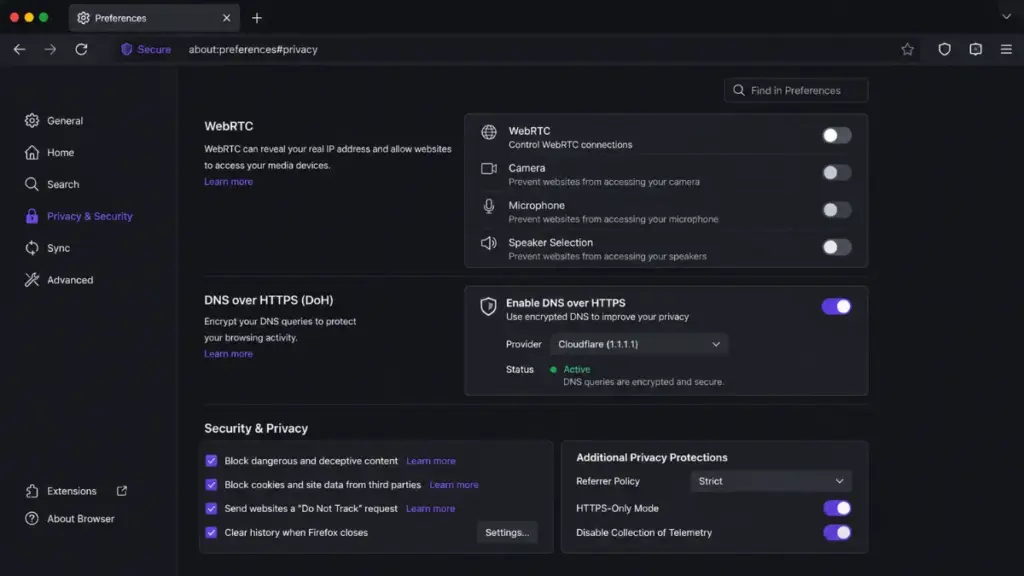
Disabling WebRTC at the Browser Level
The most permanent method to eliminate WebRTC vulnerabilities is disabling the WebRTC media framework completely within your browser settings or via registry policies:
- Mozilla Firefox: Type about:config into the address bar, search for media.peerconnection.enabled, and toggle its value to false. This completely halts all STUN candidate requests.
- Google Chrome & Chromium Browsers: Chrome does not offer a native built-in toggle to disable WebRTC entirely. Users must install official policy extensions or enforcement plugins designed to enforce the disable_non_proxied_udp policy setting.
Enforcing Encrypted System-Wide Tunnels
Rather than relying strictly on lightweight browser extensions, transition toward system-wide software solutions that operate at the network driver level. A robust, standalone application creates a virtual network adapter that captures, encrypts, and routes 100% of device traffic, including background UDP packets, DNS lookup requests, and WebRTC discovery queries.
Read more: Is Self-Hosting Your Vault With Bitwarden Password Manager Actually Safer Than Cloud Storage?
Evaluating Online Website VPN Security Before Usage
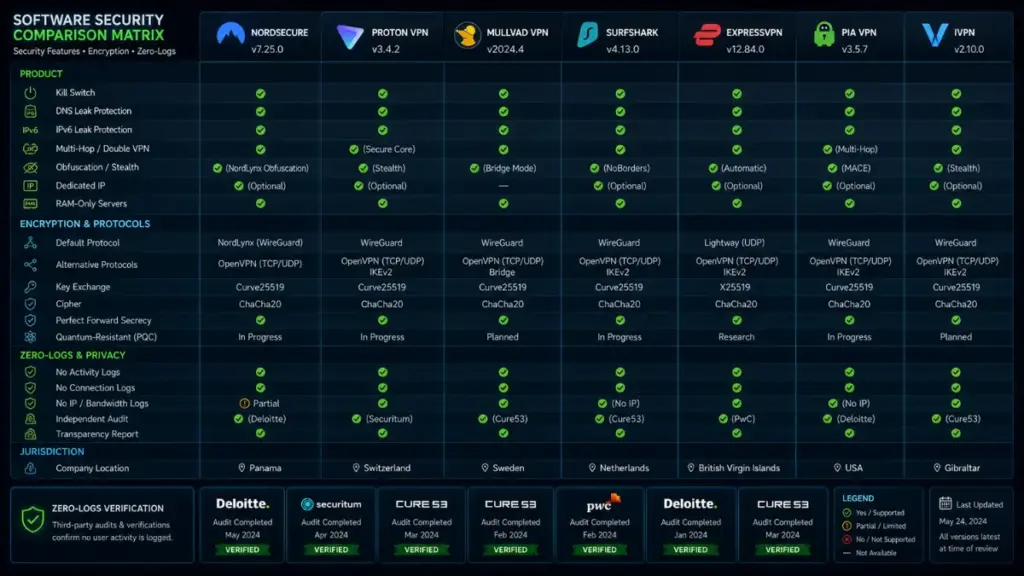
Selecting a reliable privacy solution requires careful evaluation of core technical features rather than relying on promotional headlines. When analyzing any website vpn utility, ensure the service incorporates non-negotiable architectural protections.
| Security Feature | Free Browser Proxy Extension | Encrypted System-Level VPN |
| Traffic Scope | Browser HTTP/HTTPS traffic only | 100% system-wide device traffic |
| WebRTC Protection | Vulnerable to STUN leaks | Full protection via virtual adapter |
| DNS Leak Prevention | High risk of ISP fallback | Private encrypted DNS routing |
| Monetization Model | Data collection & bandwidth resale | Transparent user subscriptions |
| Kill Switch Function | Unavailable or extension-limited | System-level internet kill switch |
| Independent Audits | Rarely provided | Frequently audited by third parties |
Prioritize providers that undergo independent, third-party security audits conducted by reputable cybersecurity firms. Furthermore, confirm that the provider enforces a strict, verified no-logs policy, ensuring your browsing habits are never recorded, analyzed, or sold.
Best Practices for Maintaining Privacy Beyond Website VPN Extensions
Achieving comprehensive digital privacy requires a multi-layered defense strategy. Relying solely on a single website vpn tool—regardless of its technical quality—is rarely sufficient against sophisticated tracking techniques, fingerprinting scripts, and network monitoring.

To construct a robust digital defense, integrate these complementary security practices into your daily digital operations:
- Deploy Script Blockers: Utilize browser privacy add-ons that block tracking scripts, fingerprinting APIs, and unnecessary third-party JavaScript from executing automatically.
- Enable DNS-over-HTTPS (DoH): Configure your browser to send all domain lookup requests through secure, encrypted HTTPS channels to trusted public resolvers, bypassing local network interception.
- Audit Browser Extensions Regularly: Remove unnecessary, outdated, or unverified extensions from your browser. Malicious actors frequently acquire legitimate extensions and push silent malware updates to active users.
- Isolate Sensitive Tasks: Use dedicated, hardened browser profiles or virtual isolated environments when managing sensitive tasks such as financial banking, corporate communications, or confidential research.
Conclusion
While free browser proxy tools offer tempting convenience for bypassing basic online blocks, their underlying security vulnerabilities present serious privacy risks. From exposing your true location through WebRTC STUN requests to leaking DNS queries directly to local service providers, an unverified website vpn plugin frequently undermines your digital safety. Worse still, P2P bandwidth harvesting schemes risk converting your personal device into an exit node for cybercriminal operations. Protecting your identity online requires discarding flawed proxy plugins in favor of verified, system-wide encryption, proper browser hardening, and continuous network testing.
LEAVE A COMMENT BELOW TO GET FREE ADVICE FROM OUR EXPERTS OR FOLLOW OUR WEBSITE THE COUCH INSIDER TO STAY UPDATED WITH THE LATEST KNOWLEDGE.