

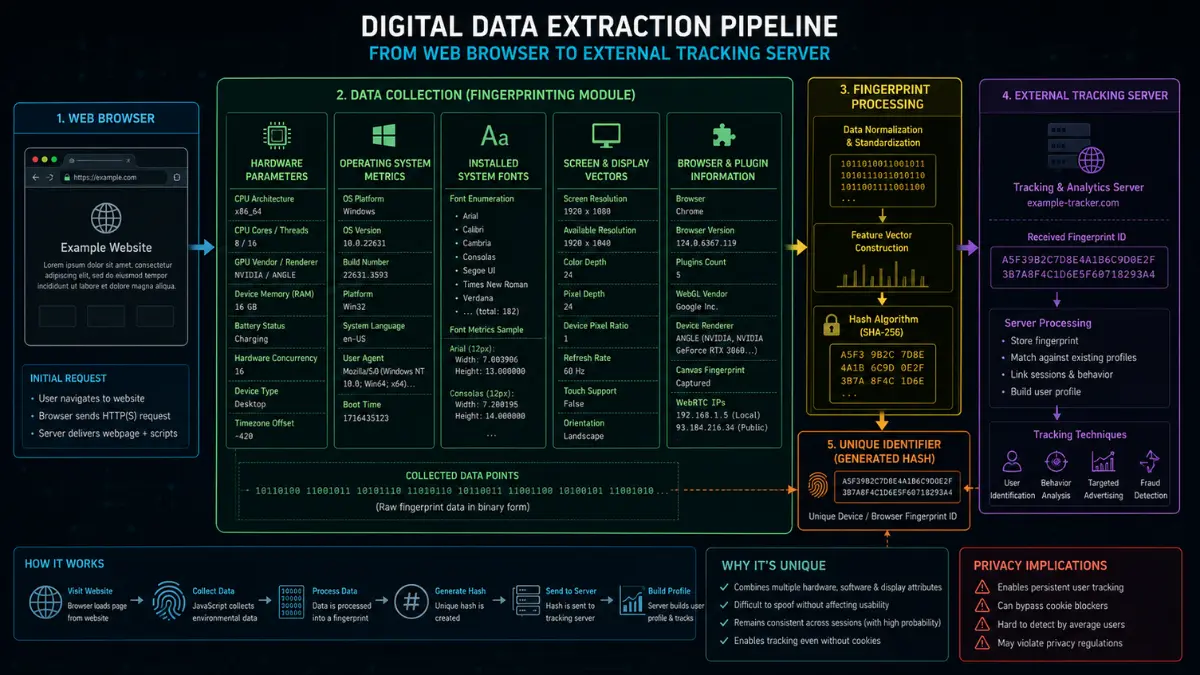

Incognito mode has long provided internet users with a comforting, albeit false, sense of digital anonymity. Millions of daily web users activate private browsing windows with the firm belief that their online activities remain completely invisible to third-party ad networks, telemetry trackers, and data brokers. However, modern tracking infrastructure has evolved far beyond traditional storage mechanisms like HTTP cookies or local storage objects. Advanced web analytics platforms now utilize sophisticated techniques categorized as browser fingerprinting to identify, track, and profile individuals across the internet without leaving a single trace of local data on the target device.
- The Incognito Illusion and How Browser Fingerprinting Operates
- Why Canvas Fingerprinting Bypasses Incognito Mode Limitations
- Audio Fingerprinting Mechanics and Hardware Level Identification
- Real-World Experience: System Entropy and the Uniqueness Paradox
- Effective Countermeasures Against Advanced Tracking Technology
- Future Outlook of Anti-Tracking Standards and Web Privacy
- Conclusion
Understanding the mechanics of browser fingerprinting reveals why standard privacy controls fall short when facing state-of-the-art surveillance tools. While private browsing modes excel at clearing local browsing histories, session cookies, and temporary form cache files upon closing a window, they do absolutely nothing to obscure the unique hardware, graphics rendering capabilities, audio processing stacks, or underlying system configurations exposed by your web browser during every single web request. This comprehensive analysis breaks down the technical mechanisms behind Canvas and Audio fingerprinting, exposes the exact limitations of private browsing, and outlines actionable engineering strategies necessary to achieve true online privacy.
The Incognito Illusion and How Browser Fingerprinting Operates
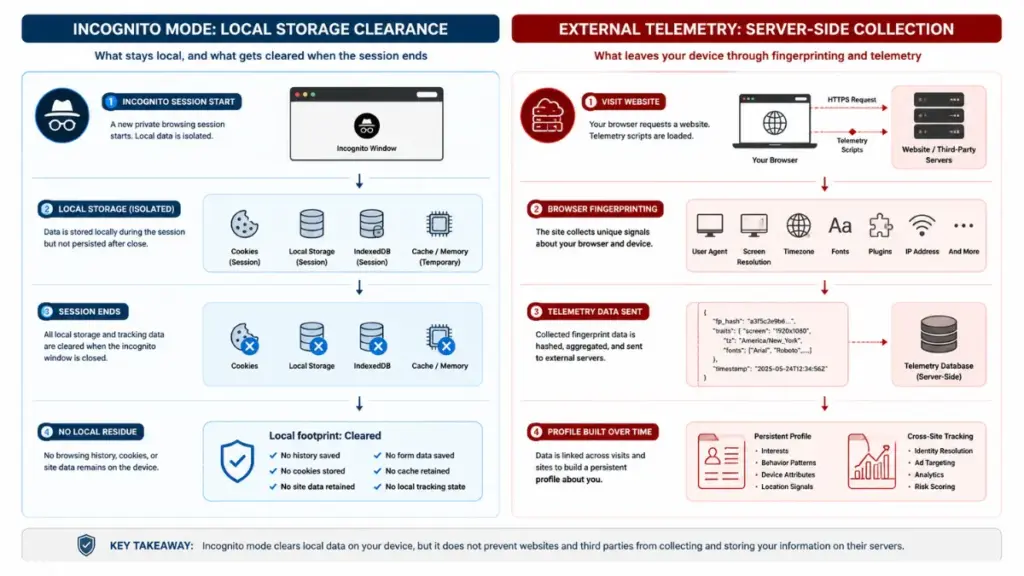
To understand why private browsing fails against modern surveillance systems, one must first dissect what private browsing actually does versus what users assume it does. When you launch an incognito session, your web browser creates an isolated temporary container. Within this container, cookies are stored separately from your primary profile, and upon closing the session, local history logs, temporary cookies, and form input data are permanently erased from your local hard drive, yet this local cleanup process remains completely visible to browser fingerprinting tracking mechanics.
Read more: Why Switching to Mobile Hotspots Protects Your Sensitive Data Better Than Public Wi-Fi
“Private browsing operates strictly as a local client-side cleanup utility, whereas browser fingerprinting is an active server-side identification engine that relies entirely on hardware signatures exposed during network handshakes.”
Luna
However, browser fingerprinting operates entirely on the server side by analyzing the technical signatures transmitted by your client software during standard web communication. Every time your computer connects to a web server, it shares a wealth of technical details through JavaScript APIs, HTTP headers, and system rendering requests. These details include your exact operating system version, browser engine build, screen color depth, system language preferences, time zone parameters, and active hardware acceleration features. When combined, these individual parameters create a uniquely identifiable profile that isolates your device among millions of internet users with astonishing statistical accuracy.
| Step Number | Phase Name | Technical Operation Details |
| Step 1 | Client Request | Browser initiates connection with remote target server |
| Step 2 | Script Execution | Web server delivers lightweight telemetry JavaScript |
| Step 3 | Metric Profiling | Script queries APIs for GPU, Audio, Fonts, and OS ID |
| Step 4 | Hash Generation | Hardware output rendered into a unique binary hash |
| Step 5 | Profile Matching | Server correlates hash with historical behavioral log |
Because browser fingerprinting relies on querying active client-side parameters rather than writing files to your hard drive, clearing your browser history or browsing in an isolated window offers zero defense. The tracking script does not need to store an tracking identifier on your device because your hardware parameters themselves serve as a permanent, unchangeable identifier. Every single connection made within an incognito window transmits identical hardware characteristics to the remote web server, rendering the protective claims of traditional private modes entirely obsolete against advanced monitoring tools.
Why Canvas Fingerprinting Bypasses Incognito Mode Limitations
Among the most prevalent techniques utilized in modern telemetry engines is Canvas Fingerprinting, an exploitation of the HTML5 Canvas element. The HTML5 Canvas API was originally designed to allow web developers to render two-dimensional graphics, dynamic animations, and custom text layouts directly within web pages using JavaScript commands. However, security researchers discovered that rendering identical graphical instructions across different computers yields tiny variations at the individual pixel level due to subtle differences in underlying hardware components, graphic processing unit architectures, display drivers, and system fonts—a vulnerability heavily exploited by browser fingerprinting systems.
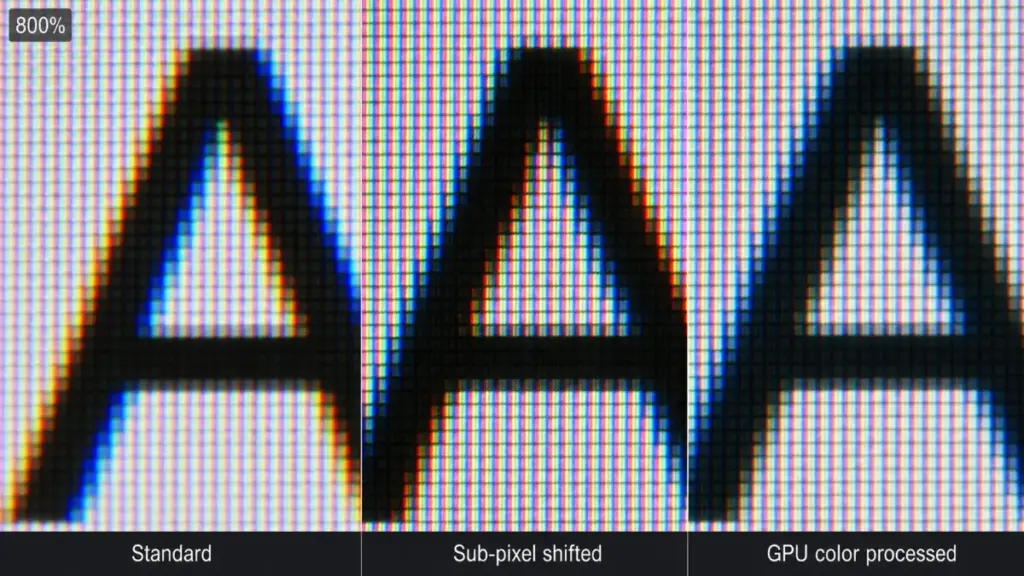
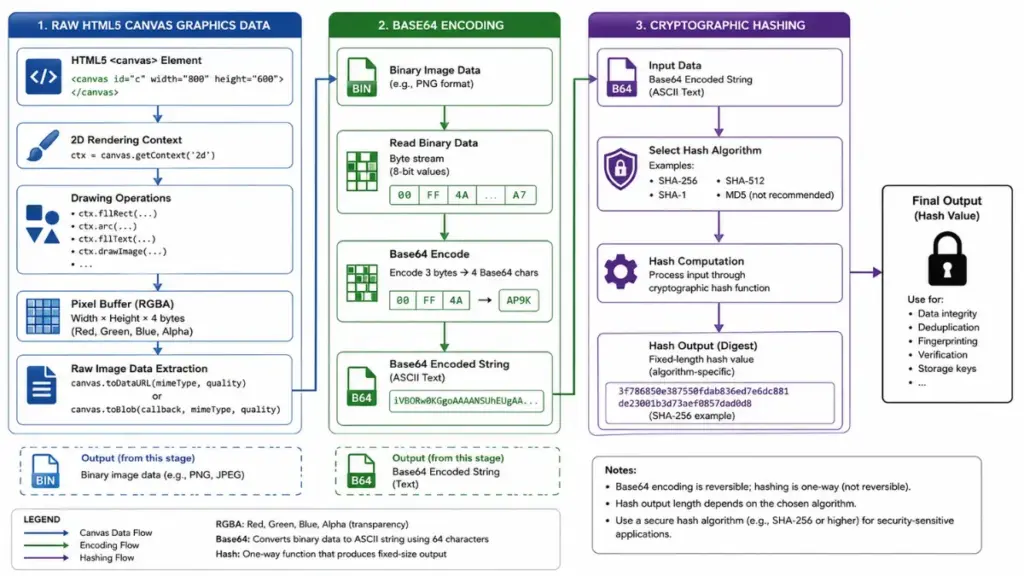
When a website executes a canvas profiling script during a browser fingerprinting routine, it silently instructs your browser to render a complex hidden scene containing hidden text strings, geometric shapes, and specific gradient overlays in the background without displaying anything on your visible screen. As your graphics card processes these commands, specialized anti-aliasing algorithms, sub-pixel rendering mechanics, and operating system rasterization routines interpret the instructions. The final rendered pixel data is then extracted using the canvas toDataURL function and converted into a cryptographic string of characters known as a hash value.
| Operating System | Graphics Hardware | Raster Engine | Resulting Hash Output |
| Windows 11 x64 | NVIDIA RTX 4080 | DirectWrite | e3b0c44298fc1c149af |
| macOS Sequoia | Apple M3 Max | Core Text | 862062c0525773e3121 |
| Ubuntu 24.04 LTS | AMD Radeon RX 7900 | FreeType | 7f83b1657ff1fc53b92 |
Because your underlying graphics processing unit, display controller drivers, and font rendering engines remain identical regardless of whether you are using a standard browsing tab or an incognito session, the generated canvas hash remains completely identical across both modes during browser fingerprinting. The tracking network calculates this hash instantly, compares it against its global database of known users, and immediately links your incognito browsing session to your primary identity profile.
Read more: How Commercial VPNs Fast-Talk Audit Reports to Claim No-Logs Guarantees
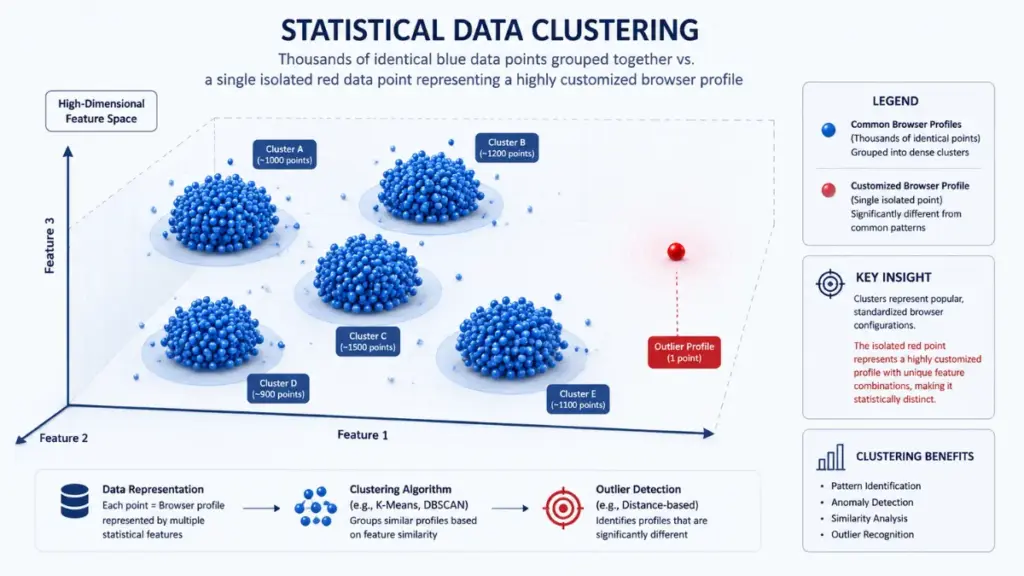
Furthermore, attempts to manually block canvas rendering often backfire. Completely disabling canvas functionality through aggressive browser security extensions creates a distinct anomaly pattern that stands out even more drastically. In a sea of standard internet traffic, an active client that completely blocks or returns empty canvas data becomes a statistical outlier, making browser fingerprinting routines even more effective at singling out and categorizing that specific user session.
Audio Fingerprinting Mechanics and Hardware Level Identification
Similar to graphical rendering anomalies, sound processing hardware displays micro-variations when performing complex mathematical computations. Audio Fingerprinting leverages the Web Audio API, an advanced browser interface designed for synthesizing, processing, and manipulating audio signals directly within the web environment. By leveraging this API, tracking scripts evaluate the minute hardware and software discrepancies inherent in your computer’s audio processing pipeline.
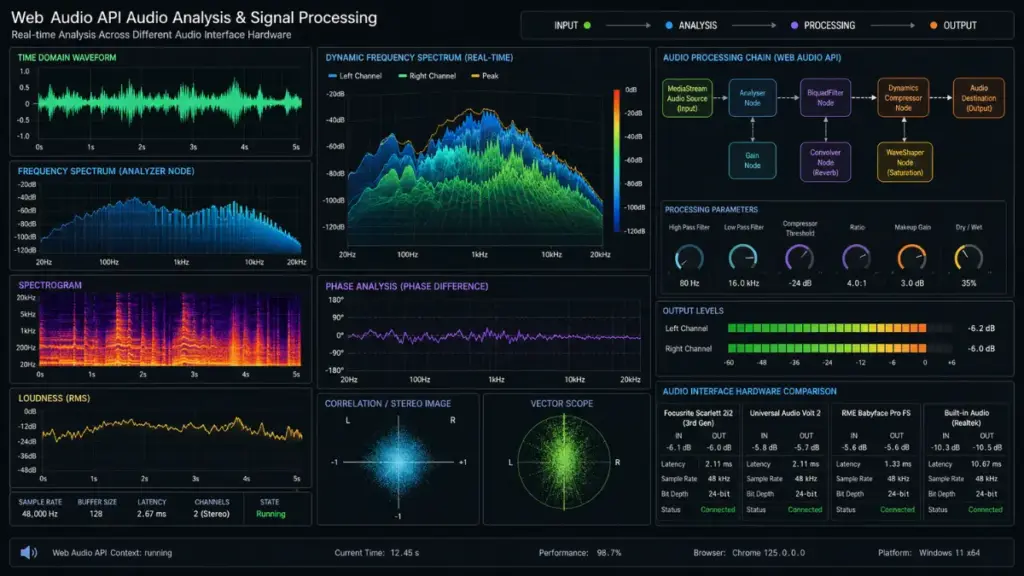
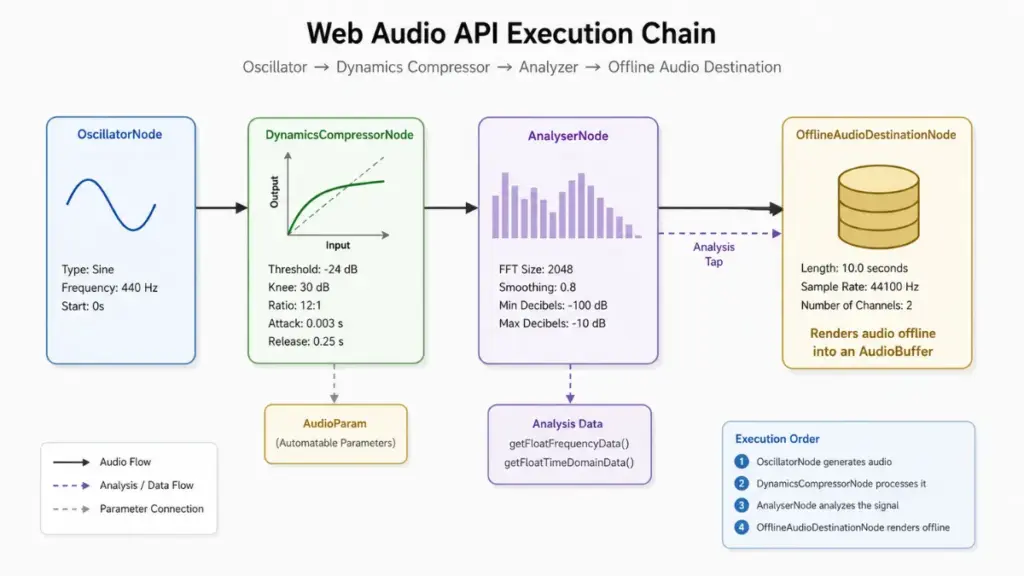
To collect an audio identity signature during browser fingerprinting, a remote tracking script initiates an AudioContext instance and directs it to process a specific audio wave through an arrangement of digital filters, gain nodes, and dynamics compressors. The script generates an audio signal, such as a high-frequency sine wave or an oscillator sweep, and processes it entirely in system memory without playing any sound through your physical speakers. The resulting processed audio signal is evaluated for minute phase shifts, amplitude variations, and mathematical rounding errors introduced by your central processor or dedicated audio chip.
- AudioContext Architecture Metrics: Evaluates how underlying audio libraries process floating-point calculations during digital signal synthesis.
- Oscillator and Dynamics Processing: Measures phase differences and signal compression behaviors unique to specific CPU architecture revisions.
- Buffer Processing Latency: Analyzes microsecond delays in signal buffer transfers across different system hardware configurations.
- Sample Rate Capabilities: Identifies hardware default sample rates, bit depth configurations, and channel mapping parameters.
The mathematical results extracted from the processed audio signal are compressed into an audio hash string. Just like canvas signatures, audio hashes remain persistent across standard and private browsing sessions because the underlying central processing unit, audio libraries, and digital-to-analog converters do not change when you open a private window. Relying on private browsing mode offers zero resistance against browser fingerprinting tactics that target hardware-level audio processing behaviors.
When combined with additional hardware metrics such as WebGL extension parameters, installed system font enumeration, battery status API readings, and physical screen resolution scaling factors, audio profiling increases the uniqueness of a user profile to near-certainty within a browser fingerprinting profile. Modern advertising networks process these multi-layered data points simultaneously, building an inescapable tracking matrix driven by browser fingerprinting that operates silently behind standard web pages.
Real-World Experience: System Entropy and the Uniqueness Paradox
In-depth technical evaluations of privacy behavior across large-scale web deployments consistently highlight a counterintuitive concept known as system entropy within browser fingerprinting systems. In information theory, entropy measures the amount of randomness or unpredictability in a set of data. When applied to web privacy and browser fingerprinting, the entropy of a browser profile determines how unique that specific configuration appears when evaluated against global traffic datasets.
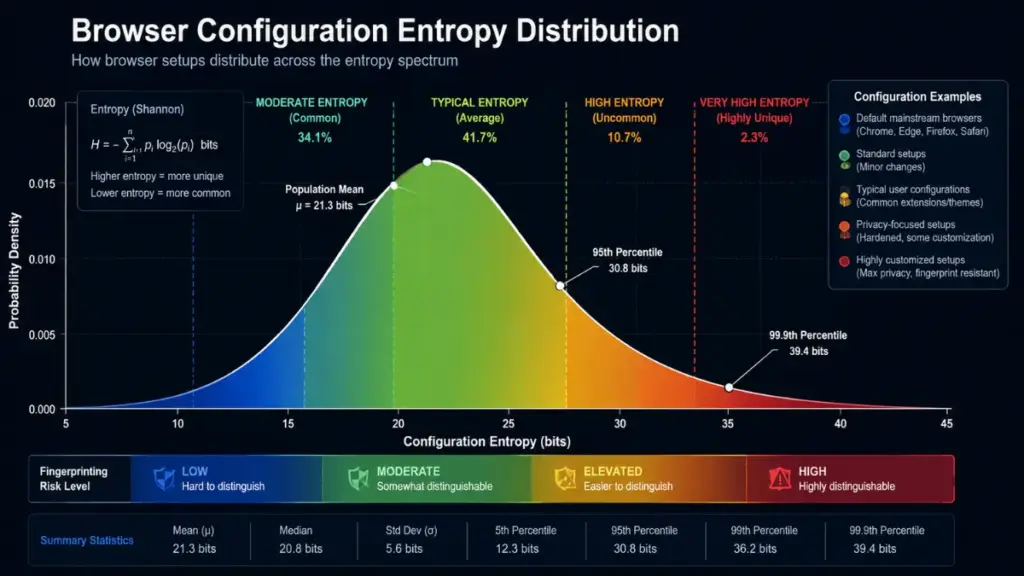
Many privacy-conscious users actively attempt to harden their browsers by installing multiple security extensions, modifying advanced system flags, altering user-agent strings, and configuring custom font rendering settings. However, extensive analytical testing reveals that these defensive modifications frequently achieve the exact opposite of their intended purpose. Every custom setting, rare browser extension combination, or unusual system configuration adds bits of entropy to your client signature.
| Configuration Profile | Entropy Level (Bits) | Uniqueness Ratio | Tracking Susceptibility |
| Stock Chrome on Windows 11 | Low (10 – 12 bits) | 1 in 4,096 Users | Moderate (Relies on Cookies) |
| Standard Firefox with RFP Enabled | Minimal (2 – 4 bits) | 1 in 16 Users | Exceptionally Low (Resistant) |
| Customized Browser + 8 Privacy Extensions | Extreme (28 – 32 bits) | 1 in 4,294,967,296 Users | Extremely High (Unique Fingerprint) |
| Incognito Session on Custom Setup | Extreme (28 – 32 bits) | 1 in 4,294,967,296 Users | Extremely High (Unique Fingerprint) |
As shown in the analytical table above, heavily modified browser environments generate exceptionally high entropy metrics. When a tracking script queries a client system and discovers a highly specific configuration—such as a custom user-agent string combined with a specific array of ad-blocking extensions and obscure screen scaling factors—the tracking engine instantly identifies that device as a statistically unique entity.
“Attempting to achieve anonymity through custom security add-ons often creates a digital paradox. By making your browser setup unique, you inadvertently craft the ultimate fingerprint for tracking systems.”
Luna
Because opening an incognito window preserves all active browser extensions and core system configurations, your elevated entropy score remains intact during private sessions. The tracking system does not need to know your real name or access your local cookies; it simply recognizes the rare combination of hardware parameters and custom settings that belongs exclusively to your device.
Effective Countermeasures Against Advanced Tracking Technology
Because standard private browsing modes fail to protect against browser fingerprinting, achieving real privacy requires adopting advanced engineering countermeasures specifically designed to combat hardware-level profiling. Broadly speaking, privacy engineers utilize two distinct methodologies to counter fingerprinting mechanics: statistical uniformity and controlled dynamic randomization.
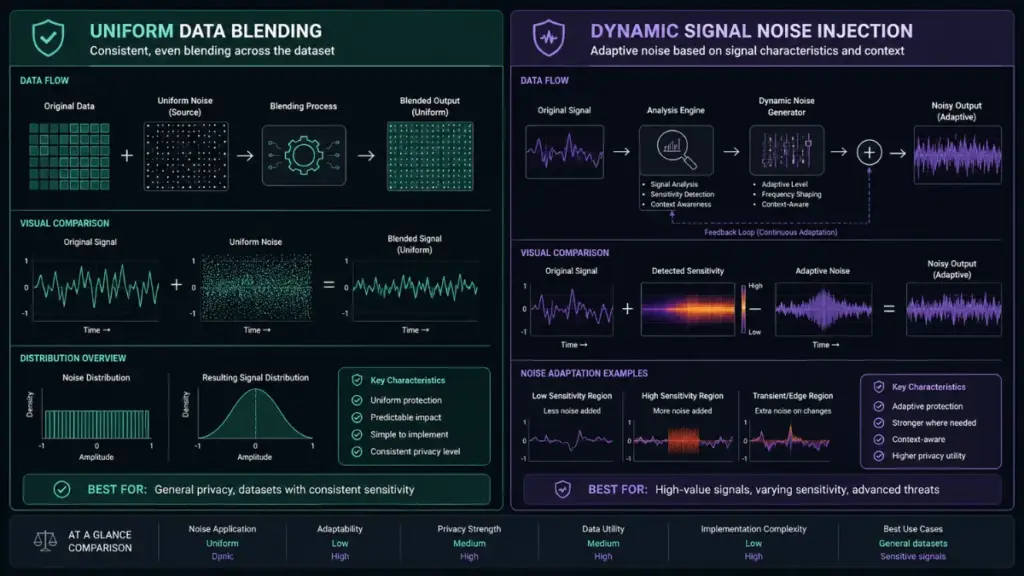
Strategy 1: Statistical Uniformity (The Blend-In Model)
The statistical uniformity model operates on a simple principle: instead of trying to hide or alter specific parameters, a browser makes its telemetry signature look completely identical to millions of other devices. When every client in a network returns the exact same canvas hash, audio profile, font list, and hardware parameters, individual users become indistinguishable within the crowd.
- Tor Browser Architecture: Forces all clients to report identical system metrics, standard screen dimensions, uniform font lists, and generic hardware capabilities regardless of actual underlying hardware.
- Firefox Resist Fingerprinting (RFP): A built-in configuration framework that spoofs time zones, standardizes canvas rendering outputs, caps display metrics, and spoof user-agent values to match baseline parameters.
Strategy 2: Dynamic Randomization and Noise Injection
The dynamic randomization strategy takes a different approach by introducing slight mathematical noise into browser API responses during every page request or session. When a tracking script attempts to generate a canvas or audio hash, the browser modifies pixel color values or audio buffer frequencies by imperceptible fractions.
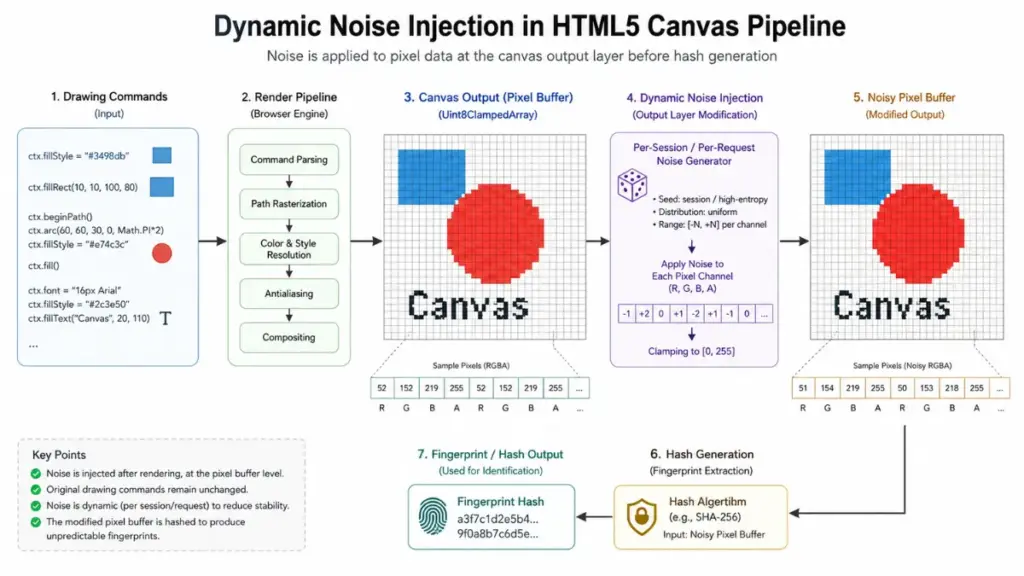
Because the injected noise alters the mathematical result during every request, the remote server receives a completely different hash output each time the script executes. This prevents tracking networks from linking multiple browsing sessions back to a single persistent profile.
Read more: The Hidden WebRTC Leaks Lurking Behind Free Online Website VPN Services
Strategy 3: Isolated Anti-Detect Environments
For specialized operations such as managing multiple professional online profiles or conducting security research, security professionals rely on dedicated anti-detect browsers. Unlike standard web browsers, these platforms allow users to build fully custom, isolated virtual browser profiles.
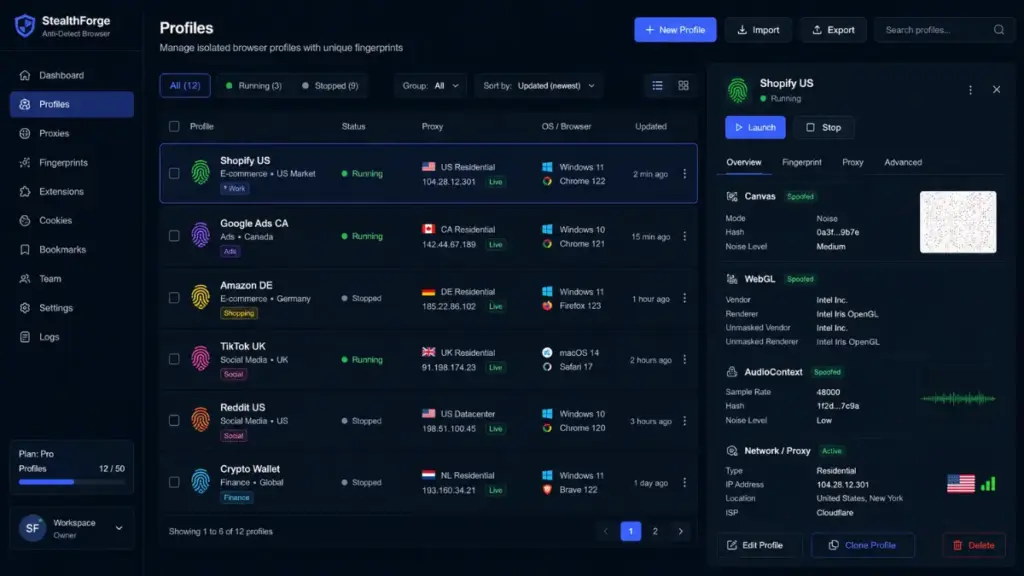
Anti-detect platforms hook directly into low-level browser APIs, allowing explicit control over canvas noise levels, audio signature outputs, WebGL parameters, screen resolutions, and font lists for each individual profile. Combined with dedicated proxy routing, these tools ensure that every operational environment maintains a completely separate, consistent, and believable hardware profile that completely isolates cross-site tracking engines.
Future Outlook of Anti-Tracking Standards and Web Privacy
The battle between tracking companies and privacy engineers is driving continuous evolution in core web standards. Regulatory frameworks such as the General Data Protection Regulation (GDPR) and California Consumer Privacy Act (CCPA) explicitly categorize digital fingerprints as personally identifiable information, making unconsented fingerprint collection illegal in many jurisdictions. However, enforcement remains technically challenging due to the passive, silent nature of server-side data gathering.
From a technological standpoint, major browser vendors are taking steps to restrict the API capabilities commonly exploited for profiling. Initiatives such as the W3C Privacy Sandbox, WebGL parameter caps, and restricted font access APIs aim to reduce the available entropy surface without breaking modern web functionality.

“Mitigating browser fingerprinting without degrading modern web capabilities requires fundamentally altering how web browsers share hardware capabilities with untrusted third-party scripts.”
Luna
Simultaneously, machine learning models are being deployed by ad networks to analyze behavioral patterns—such as mouse movement dynamics, typing cadences, and scrolling speeds—creating behavioral fingerprints that complement hardware signatures. As tracking technologies continue to evolve beyond traditional metrics, relying on basic tools like incognito mode becomes increasingly insufficient for maintaining digital privacy.

Conclusion
Incognito mode provides essential local security by preventing local users from viewing your browsing history, clearing stored session cookies, and removing temporary form data. However, as an anti-tracking defense against modern telemetry platforms, private browsing is completely ineffective. Techniques such as canvas profiling, audio context analysis, and system parameter harvesting operate below the level of local data storage, extracting persistent hardware signatures that bypass standard private browsing protections. Understanding the mechanics of browser fingerprinting makes it clear that achieving true online privacy requires moving beyond basic private windows and adopting robust defenses, such as statistical uniformity tools, dynamic noise injection, or anti-detect environments.
PLEASE LEAVE A COMMENT BELOW TO RECEIVE FREE EXPERT CONSULTATION OR FOLLOW OUR WEBSITE THE COUCH INSIDER TO STAY UPDATED WITH THE LATEST MENTAL HEALTH INSIGHTS.